


Best Marketing Automation Software for Small Businesses
Running a small business means wearing multiple hats. From generating leads and responding to customer inquiries to managing email campaigns and tracking sales, business owners often juggle countless responsibilities with limited time and resources.
As your customer base grows, manually handling every marketing task becomes increasingly difficult. Sending follow-up emails, nurturing leads, segmenting audiences, recovering abandoned carts, and measuring campaign performance can quickly become overwhelming.
This is where marketing automation software becomes a valuable investment.
Modern marketing automation platforms help businesses automate repetitive tasks, personalize customer communication, improve lead management, and increase sales—all while saving time and reducing manual effort.
However, choosing the right platform isn’t always easy. With dozens of options available, each offering different features, pricing models, and integrations, selecting the best solution requires careful evaluation.
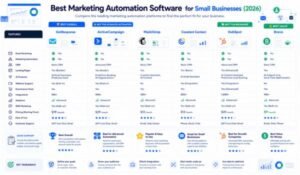
In this comprehensive guide, we’ll compare some of the leading marketing automation platforms available in 2026, including:
- GetResponse
- Constant Contact
- Mailchimp
- ActiveCampaign
We’ll evaluate each platform based on:
- Features
- Ease of use
- Automation capabilities
- Pricing
- Integrations
- Scalability
- Value for money
By the end of this guide, you’ll have a clear understanding of which marketing automation software best fits your business needs.
Why Marketing Automation Matters
Marketing automation is no longer reserved for large enterprises. Today, small businesses can leverage automation to compete more effectively by delivering timely, personalized customer experiences without significantly increasing workload.
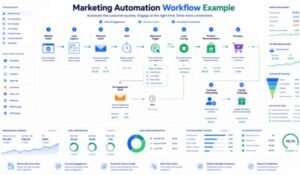
Here are some of the key reasons why marketing automation has become essential.
Save Time
Repetitive marketing tasks consume valuable time.
Automation can handle:
- Welcome emails
- Lead nurturing
- Follow-up campaigns
- Appointment reminders
- Abandoned cart recovery
- Customer onboarding
- Birthday emails
- Product recommendations
This allows business owners to focus on strategy and growth instead of repetitive manual work.
Improve Customer Experience
Customers expect personalized communication. Marketing automation enables businesses to deliver relevant messages based on subscriber behavior, preferences, and purchase history.
Examples include:
- Personalized email recommendations
- Behavior-based campaigns
- Automated follow-ups
- Customer lifecycle messaging
This creates a more engaging and satisfying customer experience.
Increase Lead Conversion
Not every visitor is ready to buy immediately.
Automation helps nurture prospects through educational content, product information, testimonials, and timely offers until they’re ready to make a purchase.
Generate More Revenue
Automated campaigns often outperform manual campaigns because they reach customers at the right moment.
Popular revenue-generating automations include:
- Abandoned cart emails
- Upsell campaigns
- Cross-sell recommendations
- Product review requests
- Loyalty rewards
Scale Your Marketing
As your business grows, automation enables you to communicate with thousands of customers without dramatically increasing your marketing workload.
This scalability makes automation particularly valuable for growing startups and ecommerce businesses.
Features to Look For in Marketing Automation Software
Not all marketing automation platforms offer the same capabilities. Before choosing a solution, consider which features are most important for your business.
1. Email Marketing
Email remains one of the highest-performing digital marketing channels.
Look for:
- Drag-and-drop email builder
- Responsive templates
- Personalization
- Segmentation
- Scheduling
- A/B testing
2. Visual Automation Builder
A visual workflow builder simplifies the creation of automated customer journeys.
Common workflow components include:
- Triggers
- Conditions
- Delays
- Actions
- Goal tracking
The easier the builder is to use, the faster your team can create and optimize campaigns.
3. CRM Integration
Customer Relationship Management (CRM) integration allows businesses to:
- Track leads
- Manage contacts
- Monitor sales pipelines
- Personalize communication
- Improve collaboration between marketing and sales teams
4. Landing Page Builder
Integrated landing pages eliminate the need for separate software.
Useful features include:
- Responsive templates
- Form builders
- SEO settings
- A/B testing
- Analytics
- Conversion optimization
5. Ecommerce Features
If you sell products online, look for automation tools that support:
- Abandoned cart recovery
- Purchase tracking
- Product recommendations
- Transactional emails
- Customer segmentation
6. Analytics & Reporting
Comprehensive analytics help businesses understand campaign performance.
Track:
- Open rates
- Click-through rates
- Conversion rates
- Revenue
- Customer engagement
- Funnel performance
7. AI Features
Artificial intelligence is becoming a standard feature in modern marketing platforms.
Useful AI capabilities include:
- Subject line generation
- Email copy creation
- Predictive sending
- Audience insights
- Workflow recommendations
8. Integrations
Your marketing software should integrate with tools you already use.
Popular integrations include:
- Shopify
- WooCommerce
- WordPress
- Stripe
- PayPal
- Google Analytics
- Zapier
- Facebook Ads
- Google Ads
GetResponse Overview
GetResponse has evolved from a traditional email marketing platform into one of the most comprehensive all-in-one marketing automation solutions available today.
Its combination of email marketing, automation, landing pages, webinars, AI tools, ecommerce features, and CRM functionality makes it particularly attractive for growing businesses.
Best For
- Small businesses
- Ecommerce stores
- Bloggers
- Coaches
- Online educators
- Agencies
- SaaS companies
- Digital marketers
Key Features
- Email marketing
- Marketing automation
- AI email generator
- Landing page builder
- Website builder
- Webinar hosting
- CRM
- Conversion funnels
- Ecommerce automation
- SMS marketing (selected plans)
- Web push notifications
- Detailed analytics
Automation Capabilities
GetResponse offers one of the strongest automation systems in its category.
Businesses can automate:
- Welcome emails
- Lead nurturing
- Customer onboarding
- Product recommendations
- Webinar reminders
- Abandoned cart recovery
- Re-engagement campaigns
- Purchase follow-ups
The visual automation builder makes creating complex customer journeys accessible, even for beginners.
Advantages
- Excellent automation workflows
- Built-in webinar hosting
- AI-powered tools
- Comprehensive landing page builder
- Strong ecommerce functionality
- High email deliverability
- User-friendly interface
- Scalable plans
Potential Limitations
- Advanced features are available on higher-tier plans.
- Costs increase as subscriber lists grow.
- CRM features are lighter than dedicated enterprise CRM platforms.
Why GetResponse Stands Out
Unlike many competitors, GetResponse combines multiple marketing tools into one platform, reducing the need for separate subscriptions.
For businesses that need email marketing, automation, webinars, landing pages, and CRM functionality in a single solution, GetResponse offers exceptional overall value.
Constant Contact Overview
Constant Contact is one of the most established names in email marketing. It is known for its beginner-friendly interface, reliable email delivery, and straightforward campaign management, making it a popular choice for small businesses, nonprofits, and local organizations.
While it doesn’t offer the same level of advanced automation as some competitors, it excels at helping users launch professional email campaigns quickly.
Best For
- Small local businesses
- Restaurants
- Nonprofits
- Event organizers
- Retail stores
- Service-based businesses
- Beginners with limited technical experience
Key Features
- Email marketing
- Newsletter templates
- Contact management
- Basic automation
- Event marketing tools
- Surveys and polls
- Social media posting
- Ecommerce integrations
- Reporting dashboard
Automation Capabilities
Constant Contact includes basic automation features such as:
- Welcome emails
- Birthday emails
- Anniversary emails
- Follow-up emails
- Simple drip campaigns
These tools are sufficient for businesses with straightforward marketing needs, but they lack advanced workflow builders, behavioral triggers, and AI-powered automation.
Advantages
- Easy-to-use interface
- Excellent customer support
- Quick campaign creation
- Strong deliverability
- Event management features
- Suitable for beginners
Potential Limitations
- Limited marketing automation
- No built-in webinar platform
- Basic CRM functionality
- Fewer ecommerce automation tools
- Less advanced analytics
Mailchimp Overview
Mailchimp has long been one of the most recognizable email marketing platforms. It offers an intuitive interface, a generous template library, and a wide range of integrations, making it a strong option for startups and growing businesses.
Over time, Mailchimp has expanded beyond email marketing by introducing automation, AI-powered recommendations, landing pages, and customer journey tools.
Best For
- Freelancers
- Bloggers
- Startups
- Small businesses
- Ecommerce stores
- Marketing beginners
Key Features
- Email marketing
- Landing pages
- Customer journeys
- Marketing calendar
- Signup forms
- AI content suggestions
- Audience segmentation
- Ecommerce integrations
- Analytics dashboard
Automation Features
Mailchimp supports:
- Welcome series
- Abandoned cart emails
- Product follow-ups
- Customer journeys
- Behavioral targeting
- Date-based automations
Although capable, Mailchimp’s automation is generally less flexible than dedicated automation platforms like GetResponse or ActiveCampaign.
Advantages
- Beginner-friendly
- Large template library
- Good ecommerce integrations
- AI-assisted content creation
- Excellent reporting
- Wide app ecosystem
Potential Limitations
- Advanced automation requires higher-tier plans
- Costs increase as subscriber lists grow
- Limited webinar functionality
- CRM features are relatively basic
ActiveCampaign Overview
ActiveCampaign is widely recognized for its advanced marketing automation and CRM capabilities. It is particularly well-suited for businesses that prioritize sophisticated customer journeys and sales automation.
Although it requires a steeper learning curve, it offers extensive customization for marketers who need more control.
Best For
- SaaS companies
- Marketing agencies
- Growing ecommerce brands
- B2B organizations
- Sales-focused businesses
Key Features
- Advanced email marketing
- Marketing automation
- CRM
- Sales automation
- Predictive sending
- Lead scoring
- Site tracking
- Dynamic content
- Machine learning features
Automation Features
ActiveCampaign provides:
- Multi-step workflows
- Conditional logic
- Lead scoring
- Behavioral triggers
- Predictive automation
- CRM-based automation
- Sales pipeline automation
Its automation capabilities are among the most advanced in the industry.
Advantages
- Exceptional automation
- Powerful CRM
- Highly customizable workflows
- Predictive sending
- Advanced segmentation
- Strong reporting
Potential Limitations
- More difficult for beginners
- Higher pricing
- Longer setup time
- Can be overwhelming for small teams
Feature Comparison
| Feature | GetResponse | Constant Contact | Mailchimp | ActiveCampaign |
| Email Marketing | ⭐⭐⭐⭐⭐ | ⭐⭐⭐⭐☆ | ⭐⭐⭐⭐⭐ | ⭐⭐⭐⭐⭐ |
| Marketing Automation | ⭐⭐⭐⭐⭐ | ⭐⭐⭐☆☆ | ⭐⭐⭐⭐☆ | ⭐⭐⭐⭐⭐ |
| Landing Pages | ⭐⭐⭐⭐⭐ | ⭐⭐⭐⭐☆ | ⭐⭐⭐⭐☆ | ⭐⭐⭐⭐☆ |
| Webinar Hosting | ✅ Yes | ❌ No | ❌ No | ❌ No |
| CRM | ✅ Built-in | Basic | Basic | Advanced |
| AI Features | ✅ Yes | Limited | Yes | Yes |
| Ecommerce Automation | ⭐⭐⭐⭐⭐ | ⭐⭐⭐☆☆ | ⭐⭐⭐⭐☆ | ⭐⭐⭐⭐⭐ |
| Ease of Use | ⭐⭐⭐⭐☆ | ⭐⭐⭐⭐⭐ | ⭐⭐⭐⭐⭐ | ⭐⭐⭐⭐☆ |
| Scalability | ⭐⭐⭐⭐⭐ | ⭐⭐⭐⭐☆ | ⭐⭐⭐⭐☆ | ⭐⭐⭐⭐⭐ |
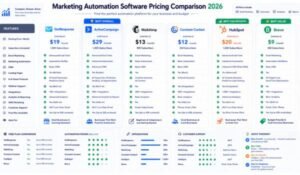
Pricing Comparison
Pricing is an important factor for small businesses. While exact costs vary depending on the number of contacts and selected features, the overall value differs between platforms.
| Platform | Free Plan | Entry-Level Value | Best For |
| GetResponse | ✅ Yes | High value with automation | Growing businesses |
| Constant Contact | Trial available | Simple email marketing | Beginners & local businesses |
| Mailchimp | ✅ Yes | Good for startups | Small businesses |
| ActiveCampaign | Limited trial | Premium automation | Scaling businesses |
Which Platform Offers the Best Value?
GetResponse
Best for businesses seeking an all-in-one platform with email marketing, automation, landing pages, webinars, ecommerce tools, and CRM features.
Constant Contact
Ideal for organizations that need reliable email marketing with minimal complexity.
Mailchimp
A strong option for startups and small businesses looking for an easy-to-use platform with solid templates and integrations.
ActiveCampaign
The best fit for companies requiring advanced automation, lead scoring, and sales-focused workflows.
Quick Buying Guide
Choose GetResponse If You Need
- Marketing automation
- Webinar hosting
- Landing pages
- Conversion funnels
- Ecommerce automation
- AI-powered email tools
- Strong overall value
Choose Constant Contact If You Need
- Easy email campaigns
- Event marketing
- Excellent support
- Simple contact management
Choose Mailchimp If You Need
- Beginner-friendly tools
- Strong template library
- Startup-friendly platform
- Wide range of integrations
Choose ActiveCampaign If You Need
- Enterprise-level automation
- CRM integration
- Advanced segmentation
- Sophisticated customer journeys
Pros & Cons of the Best Marketing Automation Software
Choosing the right marketing automation platform requires balancing features, ease of use, scalability, and budget. Below is a quick overview of the strengths and weaknesses of each platform.
GetResponse
Pros
- Complete all-in-one marketing platform
- Powerful visual automation builder
- Built-in webinar hosting
- AI-powered email creation
- Landing page builder included
- Conversion funnels
- Ecommerce automation
- Built-in CRM
- Excellent email deliverability
- User-friendly interface
- Scalable pricing for growing businesses
Cons
- Advanced automation features are available on higher-tier plans
- CRM is not as extensive as enterprise CRM platforms
- Costs increase with larger subscriber lists
Constant Contact
Pros
- Beginner-friendly interface
- Excellent customer support
- Reliable email deliverability
- Event marketing tools
- Easy campaign creation
- Good template library
Cons
- Limited marketing automation
- No built-in webinar platform
- Basic CRM functionality
- Fewer AI-powered features
Mailchimp
Pros
- Easy-to-use dashboard
- Extensive email templates
- AI-assisted content suggestions
- Strong ecommerce integrations
- Large integration marketplace
- Good analytics
Cons
- Automation is less flexible than dedicated automation platforms
- Advanced features require premium plans
- Pricing increases quickly as contact lists grow
ActiveCampaign
Pros
- Industry-leading automation
- Advanced CRM
- Predictive sending
- Sophisticated segmentation
- Sales automation
- Excellent reporting
Cons
- Higher learning curve
- Premium pricing
- More complex setup for beginners
Overall Feature Comparison
| Feature | GetResponse | Constant Contact | Mailchimp | ActiveCampaign |
| Email Marketing | ⭐⭐⭐⭐⭐ | ⭐⭐⭐⭐☆ | ⭐⭐⭐⭐⭐ | ⭐⭐⭐⭐⭐ |
| Marketing Automation | ⭐⭐⭐⭐⭐ | ⭐⭐⭐☆☆ | ⭐⭐⭐⭐☆ | ⭐⭐⭐⭐⭐ |
| Landing Pages | ⭐⭐⭐⭐⭐ | ⭐⭐⭐⭐☆ | ⭐⭐⭐⭐☆ | ⭐⭐⭐⭐☆ |
| Webinar Hosting | ⭐⭐⭐⭐⭐ | ⭐☆☆☆☆ | ⭐☆☆☆☆ | ⭐☆☆☆☆ |
| CRM | ⭐⭐⭐⭐☆ | ⭐⭐⭐☆☆ | ⭐⭐⭐☆☆ | ⭐⭐⭐⭐⭐ |
| AI Features | ⭐⭐⭐⭐⭐ | ⭐⭐☆☆☆ | ⭐⭐⭐⭐☆ | ⭐⭐⭐⭐☆ |
| Ecommerce | ⭐⭐⭐⭐⭐ | ⭐⭐⭐☆☆ | ⭐⭐⭐⭐☆ | ⭐⭐⭐⭐⭐ |
| Ease of Use | ⭐⭐⭐⭐☆ | ⭐⭐⭐⭐⭐ | ⭐⭐⭐⭐⭐ | ⭐⭐⭐⭐☆ |
| Scalability | ⭐⭐⭐⭐⭐ | ⭐⭐⭐⭐☆ | ⭐⭐⭐⭐☆ | ⭐⭐⭐⭐⭐ |
| Overall Value | ⭐⭐⭐⭐⭐ | ⭐⭐⭐⭐☆ | ⭐⭐⭐⭐☆ | ⭐⭐⭐⭐⭐ |
Frequently Asked Questions (FAQs)
1. What is marketing automation software?
Marketing automation software helps businesses automate repetitive marketing tasks such as email campaigns, lead nurturing, customer segmentation, follow-ups, and customer journey management.
2. Which marketing automation software is best for small businesses?
For businesses looking for an all-in-one solution with email marketing, landing pages, webinars, automation, and ecommerce tools, GetResponse offers one of the strongest feature sets. The ideal choice, however, depends on your business goals, technical requirements, and budget.
3. Which platform is easiest to use?
Constant Contact and Mailchimp are generally considered the most beginner-friendly due to their intuitive interfaces and simple setup processes.
4. Which platform has the best automation?
ActiveCampaign and GetResponse provide some of the most advanced automation capabilities, including visual workflow builders, behavioral triggers, and lead scoring.
5. Is marketing automation worth it for small businesses?
Yes. Marketing automation can save time, improve customer engagement, increase lead conversions, and help businesses scale their marketing efforts without significantly increasing manual work.
6. Can I use marketing automation for ecommerce?
Absolutely. Platforms such as GetResponse, Mailchimp, and ActiveCampaign support ecommerce features like abandoned cart recovery, product recommendations, and purchase-based automation.
7. Do I need coding knowledge?
No. Most modern marketing automation platforms provide drag-and-drop builders and pre-designed templates, making them accessible to users without technical expertise.
8. Which platform offers webinar functionality?
Among the platforms compared in this guide, GetResponse stands out by offering built-in webinar hosting, reducing the need for additional webinar software.
9. How do I choose the right marketing automation software?
Evaluate platforms based on:
- Ease of use
- Automation capabilities
- CRM integration
- Pricing
- Ecommerce support
- Reporting
- Scalability
- Integration with your existing tools
10. Can I switch platforms later?
Yes, but migrating contacts, workflows, templates, and automation sequences may require time and planning. Choosing a scalable platform from the beginning can help reduce future migration challenges.
Final Recommendation
Every business has unique marketing needs, so there is no universal “best” platform for everyone. However, after comparing features, automation capabilities, ease of use, pricing value, and scalability, some clear recommendations emerge.
Choose GetResponse If:
- You want an all-in-one marketing platform.
- You need advanced automation without enterprise-level complexity.
- You plan to build landing pages and conversion funnels.
- You want built-in webinar hosting.
- You operate an ecommerce business.
- You expect your business to grow over the next few years.
Choose Constant Contact If:
- You are new to email marketing.
- You mainly send newsletters and promotional emails.
- You value simplicity and responsive customer support.
Choose Mailchimp If:
- You want an easy-to-use platform with a broad ecosystem.
- You run a startup or small business.
- You need reliable email marketing and basic automation.
Choose ActiveCampaign If:
- You require advanced CRM capabilities.
- You need highly customizable automation.
- Your sales and marketing teams rely on complex workflows.
Expert Verdict
For most small and growing businesses, GetResponse provides the best balance of automation, usability, ecommerce tools, landing pages, webinar hosting, AI-powered features, and overall value.
Businesses focused on advanced sales automation may prefer ActiveCampaign, while beginners may appreciate the simplicity of Constant Contact or Mailchimp.
The right decision ultimately depends on your current needs and long-term growth plans.
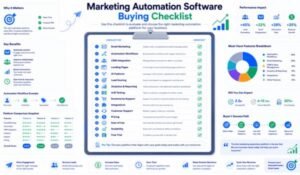
Buyer Checklist
Before selecting a marketing automation platform, ask yourself:
- What is my monthly budget?
- How many contacts do I have?
- Do I need advanced automation?
- Will I build landing pages?
- Do I need webinar functionality?
- Is CRM integration important?
- Do I run an ecommerce business?
- Which third-party tools must integrate with the platform?
- How much technical experience does my team have?
- Will the platform support future business growth?
Answering these questions will help you choose a solution that aligns with your marketing objectives.
Ready to automate your marketing and grow your business?
Start by identifying your most repetitive marketing tasks—such as welcome emails, lead nurturing, or abandoned cart reminders—and choose a platform that can automate them effectively. Whether your priority is simplicity, advanced automation, ecommerce growth, or integrated marketing tools, investing in the right software today can save time, improve customer relationships, and drive sustainable business growth.
SEO Keyword Strategy
Primary Keyword
- Best Marketing Automation Software
Secondary Keywords
- Marketing automation tools
- Email marketing software
- Marketing automation platform
- Automation software for small businesses
- Best email automation software
- CRM and marketing automation
- Ecommerce automation tools
- AI marketing software
- Marketing workflow software
- Lead nurturing software
- Conversion funnel software
- Customer journey automation
- Small business marketing tools
- Email campaign automation
- Digital marketing software
Long-Tail Keywords
- Best marketing automation software for small businesses
- Affordable marketing automation software
- Marketing automation tools comparison
- Best email marketing automation platform
- Marketing automation software with CRM
- Marketing automation software with landing pages
- AI-powered marketing automation tools
- Marketing automation software for ecommerce
- Beginner-friendly marketing automation platform
- Marketing automation buying guide
Suggested Internal Links
To strengthen topical authority, link this article to:
- Marketing Automation for Beginners
- GetResponse Review 2026
- GetResponse vs Constant Contact
- Best Email Marketing Software
- Landing Page Builder Guide
- Email Marketing Best Practices
- Lead Generation Strategies
- CRM Guide for Small Businesses
- Ecommerce Marketing Guide
- Conversion Rate Optimization (CRO)
Conclusion
Marketing automation has become a key driver of business growth, helping companies streamline communication, personalize customer experiences, and improve marketing efficiency. While every platform reviewed in this guide offers valuable capabilities, the best choice depends on your specific goals, budget, and technical requirements.
If you want a solution that combines powerful automation, email marketing, landing pages, webinars, ecommerce features, and AI-powered tools in one platform, GetResponse is a compelling option for many small businesses. At the same time, Constant Contact, Mailchimp, and ActiveCampaign each offer unique strengths that may better suit certain use cases.
Take the time to evaluate your current needs and future growth plans. Choosing the right marketing automation software today can help your business save time, improve customer engagement, and build a more scalable marketing strategy for the years ahead.
Leave a Reply