


How to Use Copymatic AI to Write SEO Blog Posts
Introduction
Creating high-quality blog posts that rank well on search engines has become more challenging than ever. Today’s content creators need to balance search engine optimization (SEO), reader engagement, originality, and consistent publishing schedules. Producing this level of content manually can be time-consuming, especially for bloggers, freelance writers, digital marketers, and small businesses.
Artificial intelligence has transformed content creation by helping writers generate ideas, create structured drafts, and speed up repetitive writing tasks. Among the growing number of AI writing tools available, Copymatic AI has emerged as a popular choice for users who want to create SEO-friendly blog posts efficiently.
However, simply asking an AI to “write a blog” is not enough to achieve strong search engine rankings. Successful SEO blogging still requires proper keyword research, content organization, optimization, and human editing.
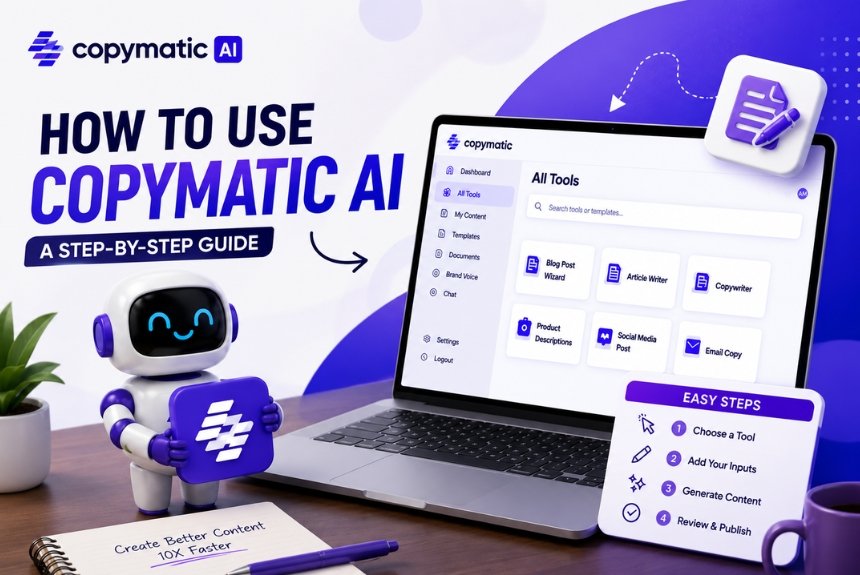
In this step-by-step guide, you’ll learn how to use Copymatic AI effectively to create blog posts that are informative, engaging, and optimized for search engines. From setting up your account to publishing your final article, we’ll cover every stage of the SEO blogging process.
By the end of this guide, you’ll know how to:
- Set up your Copymatic AI account
- Choose the best writing template
- Create SEO-friendly titles
- Build structured article outlines
- Generate long-form blog content
- Optimize articles with keywords
- Edit AI-generated content
- Publish SEO-ready blog posts
Whether you’re a beginner exploring AI writing for the first time or an experienced content marketer looking to improve productivity, this guide will help you get the most out of Copymatic AI.

Quick Workflow Overview
Before we dive into the details, here’s the overall process you’ll follow when creating an SEO blog post with Copymatic AI:
- Create your Copymatic account.
- Choose the appropriate blog writing template.
- Research your target keyword.
- Generate an SEO-friendly title.
- Build a logical article outline.
- Create the first draft with AI.
- Optimize keyword placement.
- Edit and fact-check the content.
- Add internal and external links.
- Publish and monitor performance.
Why Use AI for SEO Blogging?
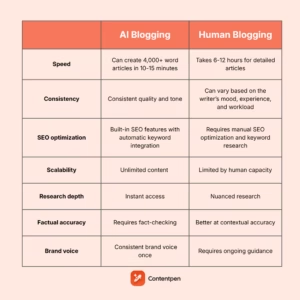
Artificial intelligence has become a valuable assistant for content creators—not because it replaces human writers, but because it helps streamline repetitive tasks and improve productivity.
Instead of spending hours brainstorming ideas or drafting articles from scratch, AI can generate structured content in minutes, allowing writers to focus on refining, optimizing, and adding unique insights.
Benefits of AI-Assisted SEO Blogging
1. Save Time
One of the biggest advantages of AI writing tools is speed.
Tasks that traditionally require several hours—such as creating outlines, drafting introductions, or writing product descriptions—can often be completed in a fraction of the time.
This allows bloggers and businesses to publish content more consistently.
2. Overcome Writer’s Block
Even experienced writers occasionally struggle to get started.
Copymatic AI can generate:
- Blog ideas
- Headline suggestions
- Introductions
- Article outlines
- First drafts
These starting points help eliminate the frustration of facing a blank page.
3. Improve Content Consistency
Maintaining a regular publishing schedule is important for both readers and search engines.
AI writing tools make it easier to produce content consistently without sacrificing quality, especially when managing multiple websites or clients.
4. Scale Content Production
Businesses and agencies often need to create large volumes of content.
Copymatic AI can assist with:
- Blog posts
- Product descriptions
- Landing pages
- Social media captions
- Email campaigns
- Marketing copy
This makes it easier to scale content marketing efforts while keeping production efficient.
5. Support SEO Best Practices
Although AI does not replace dedicated SEO tools, it can help produce well-structured content with:
- Logical headings
- Readable paragraphs
- Natural keyword placement
- Organized formatting
These elements contribute to a better user experience and provide a solid foundation for further SEO optimization.
The Importance of Human Editing
While AI can accelerate content creation, human oversight remains essential.
Always review AI-generated content to:
- Verify factual accuracy
- Add original insights and examples
- Ensure the content matches your brand voice
- Improve readability
- Optimize for search intent
- Update time-sensitive information
Think of Copymatic AI as a writing assistant that helps you work faster—not as a complete replacement for human expertise.
Setting Up Your Copymatic Account
Before you can start creating SEO blog posts, you’ll need to set up your Copymatic AI account. The process is straightforward and only takes a few minutes.

Step 1: Create an Account
Visit the official Copymatic AI website and create an account using your email address or another supported sign-in method.
Once your account is created, verify your email if required and log in to access the dashboard.
Step 2: Explore the Dashboard
After logging in, spend a few minutes familiarizing yourself with the dashboard.
Depending on your subscription and the latest platform updates, you’ll typically find sections for:
- AI writing templates
- Long-form article generation
- Saved projects
- Document management
- Account settings
- Subscription details
Understanding where each feature is located will make your workflow more efficient.
Step 3: Configure Basic Settings
Before generating your first article, review any available settings related to:
- Preferred language
- Writing tone
- Output length
- Workspace or project organization
Choosing the right preferences from the beginning helps create more relevant AI-generated content.
Step 4: Understand Available Templates
Copymatic AI offers templates for different content formats.
For SEO blogging, you’ll primarily use templates related to:
- Blog articles
- Blog outlines
- Blog introductions
- Blog conclusions
- SEO content
- Meta descriptions
- Headlines
Each template is designed for a specific purpose, so selecting the appropriate one improves the quality of the generated content.
Step 5: Organize Your Projects
If you plan to publish content regularly, create separate folders or naming conventions for different topics or clients.
For example:
- Technology
- Digital Marketing
- AI Tools
- Ecommerce
- Health
- Finance
A well-organized workspace makes it easier to manage multiple articles and revisit previous drafts.
Best Practices Before Writing
Before generating any content, make sure you have:
- A clearly defined target keyword
- A good understanding of your audience
- A specific search intent (Informational, Commercial, or Transactional)
- An outline or content goal
- A plan for internal and external linking
Preparing these elements in advance helps the AI produce more focused and relevant content.
Choosing the Right Template
One of Copymatic AI’s biggest advantages is its extensive library of writing templates. Each template is designed for a specific content type, helping users generate more relevant and structured output.
Choosing the correct template before you begin writing can significantly improve the quality of your first draft and reduce editing time later.
Why Templates Matter
Different content types require different writing styles.
For example:
- A blog post needs informative headings and detailed explanations.
- A product description focuses on features and benefits.
- An email emphasizes concise, persuasive messaging.
- A social media caption is short, engaging, and platform-specific.
Using the appropriate template helps the AI generate content that better matches your intended format and audience.
Best Templates for SEO Blog Writing
When creating SEO-focused blog posts, these templates are the most useful:
1. Blog Article Writer
This is the primary template for creating complete blog posts.
It can generate:
- Introductions
- Body content
- Conclusions
- Structured sections
- Long-form articles
Best for:
- Tutorials
- How-to guides
- Product reviews
- Listicles
- Informational content
2. Blog Outline Generator
Creating an outline before writing improves organization and ensures you cover all important subtopics.
Instead of immediately generating a full article, start by asking Copymatic AI to build an outline based on your target keyword.
Example:
Target Keyword:
Copymatic AI SEO Blog Writing
Possible outline:
- Introduction
- Why AI Helps SEO Blogging
- Choosing Templates
- Keyword Optimization
- Editing AI Content
- Publishing Tips
This approach keeps your content aligned with search intent from the beginning.
3. Blog Introduction Template
The introduction is one of the most important parts of any article.
A strong introduction should:
- Capture attention
- Explain the topic
- Address the reader’s problem
- Preview what they’ll learn
Copymatic AI can generate multiple introduction variations, allowing you to choose the one that best fits your audience.
4. Blog Conclusion Template
A well-written conclusion summarizes key points, reinforces the article’s value, and encourages readers to take action.
Use the conclusion template to generate ideas, then personalize the final version with your own recommendations and call to action.
5. Meta Description Generator
A compelling meta description can improve click-through rates from search results.
Although it doesn’t directly affect rankings, it plays an important role in attracting visitors.
A good meta description should:
- Include the target keyword
- Summarize the article
- Encourage users to click
- Stay within approximately 150–160 characters
Tips for Choosing the Right Template
Before generating content, ask yourself:
- What type of article am I creating?
- What is the search intent?
- Do I need a full article or only an outline?
- Am I writing for beginners or advanced readers?
- Will I need supporting templates such as introductions or meta descriptions?
Selecting the right template at the beginning saves time and reduces unnecessary revisions.
Writing SEO-Friendly Titles
Your title is one of the first things readers and search engines notice.
A compelling SEO title improves click-through rates, communicates the topic clearly, and helps search engines understand the page’s focus.
Characteristics of a Strong SEO Title
An effective title should:
- Include the primary keyword.
- Match the reader’s search intent.
- Clearly communicate the article’s value.
- Be concise and easy to understand.
- Encourage users to click.
Example
Instead of:
AI Writing Tips
Use:
How to Use Copymatic AI to Write SEO Blog Posts (Step-by-Step Guide)
The second title is more descriptive, includes the focus keyword, and clearly tells readers what to expect.
Ask Copymatic AI for Multiple Title Ideas
Rather than accepting the first title generated, ask Copymatic AI to create several options.
For example:
Prompt:
“Generate 10 SEO-friendly blog titles for the keyword ‘Copymatic AI SEO Blog Writing’.”
Compare the suggestions and choose the strongest one.
Use Numbers and Action Words
Titles containing numbers or action-oriented phrases often attract more attention.
Examples:
- 10 Steps to Write SEO Blog Posts with Copymatic AI
- Complete Copymatic AI SEO Blog Writing Guide
- Beginner’s Guide to Writing SEO Blogs with Copymatic AI
Match Search Intent
Always ensure the title aligns with what users are searching for.
For informational keywords like this one, phrases such as:
- How to
- Step-by-Step
- Complete Guide
- Beginner’s Guide
- Tutorial
generally perform well because they signal practical, educational content.
Avoid Common Mistakes
Avoid titles that:
- Are vague
- Mislead readers
- Stuff keywords unnaturally
- Overpromise unrealistic results
Instead, focus on clarity and relevance.
Creating Article Outlines
Before generating a full article, create a detailed outline.
An outline acts as the blueprint for your content, helping you organize ideas logically and ensuring that important subtopics aren’t overlooked.
Why Outlines Matter
A strong outline:
- Improves content organization.
- Helps maintain logical flow.
- Reduces repetitive information.
- Makes articles easier to read.
- Supports better SEO structure.
It also simplifies the writing process because you’ll already know what each section should cover.
Building an SEO Outline
Start with your primary keyword and identify the main questions users are likely to ask.
For example:
Primary Keyword:
Copymatic AI SEO Blog Writing
Possible outline:
- Introduction
- Why Use AI for SEO Blogging?
- Setting Up Copymatic AI
- Choosing the Right Template
- Writing SEO Titles
- Creating Outlines
- Generating Long-Form Content
- Keyword Optimization
- Editing AI Content
- Publishing Best Practices
- FAQs
- Final Checklist
- Conclusion
Notice how the outline follows the user’s journey from preparation to publication.
Include Supporting Keywords
As you build your outline, naturally incorporate related keywords and subtopics.
Examples include:
- AI blog writing
- SEO optimization
- Keyword research
- Blog publishing
- AI content editing
Covering related concepts helps create more comprehensive content and improves topical relevance.
Think Like Your Reader
When planning your headings, ask yourself:
- What would a beginner want to know first?
- Which steps require detailed explanations?
- What common mistakes should be addressed?
- What practical tips will make the guide more useful?
This reader-focused approach helps create content that genuinely answers user questions.
Refine the AI-Generated Outline
Although Copymatic AI can produce a solid outline, don’t hesitate to refine it.
Consider:
- Reordering sections for better flow.
- Removing repetitive headings.
- Adding missing topics.
- Including case studies or examples.
- Expanding sections that deserve more detail.
A customized outline leads to a stronger final article.
Generating Long-Form Content
Once you’ve selected the right template, created an SEO-friendly title, and built a detailed outline, it’s time to generate your first draft. This is where Copymatic AI can significantly speed up the content creation process.
Rather than writing an entire article manually, Copymatic AI helps you create structured content section by section, making it easier to maintain quality and stay aligned with your target keyword.
Step 1: Start with the Introduction
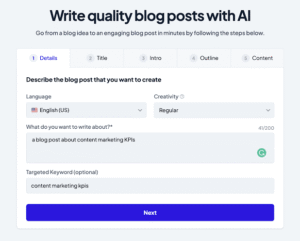
Instead of asking the AI to generate a 3,000-word article in a single prompt, begin with the introduction.
A strong introduction should:
- Introduce the topic clearly.
- Explain why it’s important.
- Address the reader’s problem.
- Preview what the article will cover.
Example Prompt
Write an engaging introduction for a blog titled “How to Use Copymatic AI to Write SEO Blog Posts.” The audience is beginner bloggers and digital marketers. Use a professional yet conversational tone.
Generating content one section at a time gives you greater control over the quality and flow of the article.
Step 2: Generate Content by Section
After completing the introduction, move through your outline one heading at a time.
For example:
- Why Use AI for SEO Blogging?
- Choosing the Right Template
- Writing SEO-Friendly Titles
- Creating Article Outlines
- Keyword Optimization
- Editing AI Content
Breaking the article into smaller sections allows you to review and improve each part before continuing.
Step 3: Expand Short Sections
Sometimes the AI generates concise answers when more detail is needed.
Instead of rewriting the entire section, use prompts such as:
- Expand this section with practical examples.
- Add beginner-friendly explanations.
- Include step-by-step instructions.
- Provide real-world use cases.
This approach produces richer, more valuable content.
Step 4: Add Original Insights
AI-generated content is a starting point—not the finished product.
To make your article stand out, include:
- Personal experience
- Case studies
- Client examples
- Industry observations
- Lessons learned
- Practical recommendations
Original insights increase credibility and provide readers with information they won’t find in generic AI-generated articles.
Step 5: Maintain a Consistent Tone
As you generate different sections, ensure the writing style remains consistent.
Review each section for:
- Tone
- Vocabulary
- Formatting
- Sentence length
- Readability
A consistent voice creates a smoother reading experience.
Optimizing with Keywords
Writing a great article is only part of SEO blogging. Search engines also need to understand what your content is about, which is why keyword optimization plays an important role.
Copymatic AI can naturally include keywords in your draft, but you should always review their placement to ensure they fit naturally within the content.
Understanding Primary and Secondary Keywords
Your primary keyword is the main search term you want the article to rank for.
For this guide, the primary keyword is:
Copymatic AI SEO Blog Writing
Secondary keywords support the main topic and help search engines understand the broader context.
Examples include:
- AI blog writing
- SEO content creation
- AI writing assistant
- Copymatic tutorial
- SEO optimization
- Blog writing workflow
Using both types of keywords naturally improves topical relevance.
Where to Place Keywords
For best results, include your primary keyword in key locations such as:
- Page title
- URL slug
- Meta title
- Meta description
- Introduction
- One or more H2 headings
- Conclusion
- Image alt text (where appropriate)
Secondary keywords can be incorporated naturally throughout the article to support the main topic.
Avoid Keyword Stuffing
A common mistake is repeating the same keyword excessively in an attempt to improve rankings.
Instead:
- Write naturally.
- Use synonyms where appropriate.
- Focus on answering the reader’s questions.
- Prioritize readability over repetition.
Search engines reward content that provides genuine value to users.
Optimize for Search Intent
Every keyword reflects a specific search intent.
Since this article targets informational intent, readers expect practical guidance rather than a sales pitch.
Your content should:
- Explain concepts clearly.
- Provide actionable steps.
- Answer common questions.
- Solve the reader’s problem.
Matching search intent improves user satisfaction and can contribute to better search performance.
Use Related Topics
Modern SEO focuses on topical relevance rather than exact keyword repetition.
Include related concepts such as:
- On-page SEO
- Content marketing
- Blog structure
- Internal linking
- Readability
- AI-assisted writing
- Keyword research
Covering related topics helps search engines understand the overall subject of your article.
SEO Tips for AI-Generated Content
Whether you use Copymatic AI or another writing assistant, these best practices can improve the quality and search performance of your content.
Write for People First
Search engines increasingly reward content that provides value to readers.
Instead of writing solely for algorithms, focus on solving real problems and answering genuine questions.
Add Examples
Examples make complex ideas easier to understand.
For instance, when explaining keyword optimization, show readers how to place keywords naturally within headings and paragraphs.
Practical demonstrations improve comprehension and keep readers engaged.
Break Up Long Paragraphs
Large blocks of text can discourage readers.
Improve readability by using:
- Short paragraphs
- Bullet points
- Numbered lists
- Tables
- Visuals
- Screenshots
This structure also makes your content easier to scan.
Include Internal Links
Link to other relevant articles on your website.
For example:
- Copymatic AI Review 2026
- Best AI Writing Tools
- Beginner’s Guide to Keyword Research
- On-Page SEO Checklist
Internal links help readers discover related content and improve your site’s overall structure.
Link to Trusted External Resources
Where appropriate, reference authoritative sources to support factual information and help readers learn more.
Examples include:
- Official product documentation
- Industry research
- Search engine guidelines
Use external links selectively and ensure they are relevant to the topic.
Common Mistakes to Avoid
Many beginners rely too heavily on AI-generated content.
Avoid these common pitfalls:
- Publishing without editing.
- Ignoring factual accuracy.
- Overusing keywords.
- Writing generic introductions.
- Skipping keyword research.
- Forgetting internal links.
- Neglecting image optimization.
- Omitting a clear call to action.
Reviewing your content before publishing will significantly improve its overall quality.
Editing AI Content
Generating a draft with Copymatic AI is only the beginning. The editing stage transforms AI-generated content into a polished, accurate, and reader-friendly article that aligns with SEO best practices and your brand voice.
Professional content creators rarely publish AI-generated text without reviewing it carefully. Editing helps eliminate errors, improve readability, and ensure the article provides genuine value.
Step 1: Fact-Check the Content
AI tools can occasionally generate outdated or incorrect information.
Before publishing, verify:
- Statistics
- Product pricing
- Software features
- Industry trends
- Dates
- Technical details
- Company information
Always cross-reference information with reliable and authoritative sources.
Step 2: Improve Readability
Readers prefer content that is easy to scan and understand.
Improve readability by:
- Using short paragraphs
- Writing concise sentences
- Breaking up long sections with headings
- Adding bullet points where appropriate
- Removing repetitive phrases
A well-formatted article keeps readers engaged and encourages them to stay on the page longer.
Step 3: Add Your Expertise
One of the biggest limitations of AI-generated content is the lack of firsthand experience.
Enhance your article by including:
- Personal observations
- Practical tips
- Real-world examples
- Case studies
- Common mistakes to avoid
- Lessons learned from your own workflow
Adding original insights helps differentiate your content from generic AI-generated articles.
Step 4: Optimize Internal and External Links
Before publishing, include relevant links to improve navigation and provide additional value.
Internal Links
Examples:
- Copymatic AI Review 2026
- Best AI Writing Tools
- SEO Keyword Research Guide
- On-Page SEO Checklist
External Links
Consider linking to trusted sources for:
- Official Copymatic AI documentation
- Google Search Central documentation
- Industry research or statistics
Well-placed links improve user experience and support your content’s credibility.
Step 5: Optimize Images
Images contribute to both user experience and SEO.
Before uploading images:
- Use descriptive file names.
- Compress images for faster loading.
- Add relevant alt text.
- Place visuals near the corresponding section.
Example:
File Name:
copymatic-ai-seo-blog-writing-dashboard.webp
Alt Text:
Copymatic AI dashboard for writing SEO blog posts
Publishing Best Practices
Once your article has been reviewed and optimized, follow these publishing best practices to maximize its visibility and long-term performance.
Image Placement 10
Image Suggestion: Blog publishing checklist or workflow diagram.
Alt Text: SEO blog publishing workflow
Write an Effective Meta Title
Your meta title should:
- Include the primary keyword.
- Clearly describe the content.
- Stay within approximately 60 characters.
- Encourage clicks.
Example:
How to Use Copymatic AI to Write SEO Blog Posts (2026 Guide)
Write a Compelling Meta Description
A good meta description should summarize the article while encouraging users to click.
Example:
Learn how to use Copymatic AI to write SEO blog posts with this step-by-step guide. Discover keyword optimization, editing tips, and publishing best practices.
Optimize Your URL
Keep your URL short, descriptive, and keyword-focused.
Example:
how-to-use-copymatic-ai-for-seo-blog-writing
Avoid unnecessary numbers, dates (unless essential), or special characters.
Add a Table of Contents
For long-form articles, a table of contents helps readers navigate quickly and improves the overall user experience.
It also increases the likelihood of earning jump links in search results.
Include Images Throughout the Article
Visual elements break up long sections of text and improve engagement.
Examples include:
- Dashboard screenshots
- Workflow diagrams
- Comparison tables
- Checklists
- Infographics
Use images to support the content rather than simply decorate the page.
Monitor Performance
Publishing is not the final step.
Track your article’s performance using analytics and SEO tools.
Monitor metrics such as:
- Organic traffic
- Keyword rankings
- Click-through rate (CTR)
- Average time on page
- Bounce rate
- User engagement
Use this data to update and improve your content over time.
Frequently Asked Questions (FAQs)
1. Can Copymatic AI write complete blog posts?
Yes. Copymatic AI can generate complete blog drafts, including introductions, headings, body content, and conclusions. However, reviewing and editing the output before publishing is recommended.
2. Is Copymatic AI good for SEO?
Copymatic AI can help create SEO-friendly content by generating structured articles and naturally incorporating keywords. To maximize search performance, combine it with keyword research, manual optimization, and careful editing.
3. Should I edit AI-generated content?
Yes. Editing is essential for improving accuracy, readability, originality, and alignment with your brand voice. Human review also helps ensure that the content reflects current information and meets your quality standards.
4. Can beginners use Copymatic AI?
Absolutely. The platform is designed with an intuitive interface that makes it accessible to beginners while still offering useful features for experienced content creators and marketers.
5. Does AI-generated content rank on Google?
Content can perform well in search results if it is accurate, helpful, original, and satisfies user intent. Simply generating text with AI does not guarantee rankings; quality, relevance, and ongoing optimization remain key factors.
Conclusion
Copymatic AI can significantly simplify the SEO blogging process by helping you generate ideas, create structured drafts, and speed up repetitive writing tasks. However, successful SEO content still depends on thoughtful planning, careful editing, and a strong understanding of your audience’s needs.
The most effective workflow combines AI efficiency with human expertise. By choosing the right template, optimizing keywords naturally, refining the generated content, and following publishing best practices, you can create blog posts that are both valuable to readers and well-positioned for search visibility.
Treat Copymatic AI as a productivity partner rather than a replacement for your knowledge. When used strategically, it can help you publish high-quality content more consistently while maintaining the originality and credibility that readers and search engines expect.
Ready to Create SEO-Friendly Blog Posts More Efficiently?
Ready to create SEO-friendly blog posts more efficiently?
Use the techniques outlined in this guide to streamline your writing process with Copymatic AI. Start with a clear keyword strategy, build a well-structured outline, edit every draft carefully, and continue improving your content based on performance data.
By combining AI-assisted writing with strong SEO practices, you can produce blog posts that attract readers, answer their questions, and support your long-term content marketing goals.
Leave a Reply