


What Is a CDN? How It Improves Website Performance
Website speed has become an important part of delivering a good online experience. Visitors expect websites to load quickly, respond smoothly, and remain available whenever they need them. When a website takes too long to load, users may leave before the page even becomes usable.
Slow websites can affect more than user satisfaction. Poor performance can contribute to lower conversions, reduced engagement, increased bounce rates, and a weaker overall perception of a brand.
One technology that can help address these challenges is a Content Delivery Network, commonly known as a CDN.
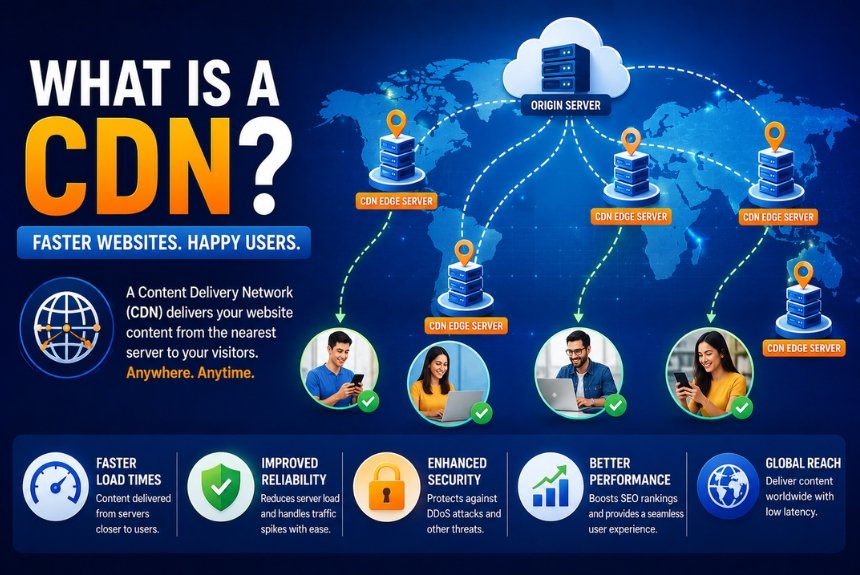
A CDN uses a distributed network of servers to deliver website content from locations closer to visitors. Instead of every visitor requesting files directly from one central hosting server, frequently requested content can be delivered from a nearby CDN server.
This can reduce latency, improve loading performance, reduce pressure on the origin server, and help websites handle traffic more efficiently.
In this guide, you’ll learn what a CDN is, how it works, why CDNs were created, the key concepts behind CDN technology, how to set one up, and the major benefits and limitations of using one.
What Is a CDN?
A Content Delivery Network (CDN) is a geographically distributed network of servers designed to deliver website content to users from locations that are closer to them.
The main purpose of a CDN is to reduce the distance that website content needs to travel between the server and the visitor.
Without a CDN, a website may rely primarily on a single origin server where its website files, applications, and other resources are hosted.
For example, imagine that your website’s origin server is located in London while a visitor accesses your website from India.
Without a CDN:
- The visitor requests your website.
- The request travels to the origin server in London.
- The server processes the request.
- Website resources travel back to the visitor.
- The visitor’s browser loads the content.
With a CDN, frequently requested static resources can be stored on an edge server closer to the visitor.
The process may look like this:
- The visitor requests your website.
- The request is routed through the CDN.
- The CDN checks whether the requested content is cached.
- If available, the nearby CDN server delivers the content.
- The visitor receives the resource without requiring every request to travel back to the origin server.
The result can be lower latency and faster content delivery, particularly for visitors who are geographically far away from the origin server.
Why Was CDN Technology Created?
The internet initially developed around centralized server infrastructure, but websites eventually began serving visitors from locations all over the world.
A website hosted in one geographic region could receive requests from users thousands of kilometers away.
As websites became more media-rich and traffic volumes increased, relying on a single server created several challenges.
Slow Loading Speeds
The farther a visitor is from the origin server, the longer data may take to travel between the user and the server.
This distance contributes to latency and can affect the overall loading experience.
Higher Latency
Latency refers to the delay between a request and the corresponding response.
Visitors located far from the origin server may experience greater network latency compared with users located closer to it.
Increased Server Workload
If every visitor requests the same images, CSS files, JavaScript files, videos, and other static resources directly from the origin server, the server has to handle a large number of repeated requests.
A CDN can cache frequently requested content and serve it independently.
Traffic Spikes
A sudden increase in visitors can put significant pressure on the origin server.
Examples include:
- A viral social media post
- A product launch
- A major sale
- Breaking news
- A marketing campaign
- A popular video becoming widely shared
A CDN can help distribute the delivery of cached resources across its network.
Poor Global User Experience
A website may perform well for visitors near its hosting location but significantly slower for visitors in distant regions.
CDNs help address this geographic performance difference by placing content on servers in multiple locations.
How Does a CDN Work?
The basic operation of a CDN involves routing requests, checking cached resources, and delivering content from an appropriate edge server.
Step 1: A User Visits Your Website
A visitor enters your domain into a browser or clicks a link to access your website.
For example:
www.example.com
The browser then begins requesting the resources required to display the page.
Step 2: DNS Helps Route the Request
The Domain Name System, or DNS, helps determine where a domain request should be directed.
When a website uses a CDN, its DNS configuration can route traffic through the CDN infrastructure.
The CDN can then determine an appropriate server or point of presence from which to handle the request.
Step 3: The CDN Checks Its Cache
The CDN checks whether it already has a cached version of the requested resource.
Common examples of content that can be cached include:
- Images
- CSS files
- JavaScript files
- Fonts
- Videos
- PDF files
- Other static assets
If the requested resource is available in the CDN cache and has not expired, the CDN can deliver it directly.
Step 4: Cached Content Is Delivered
When the requested content is already available at the appropriate edge server, the CDN serves that content to the visitor.
Because the edge server can be geographically closer to the user than the origin server, the resource may be delivered more efficiently.
Step 5: A Cache Miss Occurs
A cache miss occurs when the CDN does not have a valid cached copy of the requested resource.
In this situation, the CDN can request the resource from the origin server.
The general process is:
- Visitor requests the resource.
- CDN checks its cache.
- Resource is not available.
- CDN requests the resource from the origin server.
- Origin server returns the resource.
- CDN delivers it to the visitor.
- CDN may store a copy for future requests.
Future visitors requesting the same cacheable resource may then receive it directly from the CDN.
Core CDN Concepts You Should Know
Understanding a few basic CDN terms makes it easier to configure and troubleshoot a CDN.
Origin Server
The origin server is the primary server where your website is hosted.
It typically contains:
- Website files
- Database
- Application code
- Media
- Dynamic content
- Backend services
The CDN does not necessarily replace your hosting server. Instead, it works alongside the origin infrastructure and can cache and deliver eligible content.
Edge Servers
Edge servers are servers distributed across different geographic locations.
Their purpose is to bring content delivery closer to end users.
When a visitor requests cached content, the CDN can select an appropriate edge location based on factors such as network conditions and geographic proximity.
A larger and strategically distributed CDN network can provide broader geographic coverage.
Caching
Caching means storing a copy of content so that it can be delivered more quickly when requested again.
Common cacheable resources include:
- Images
- CSS
- JavaScript
- Fonts
- Videos
- PDFs
Not every type of website content should automatically be cached.
Dynamic or personalized content may require different caching rules because it can change frequently or contain user-specific information.
Cache Hit
A cache hit occurs when the requested resource is already available in the CDN cache.
The CDN can then serve the resource without needing to retrieve it from the origin server.
Potential benefits include:
- Faster content delivery
- Reduced origin server requests
- Lower origin bandwidth usage
- Better scalability for static content
Cache Miss
A cache miss occurs when the requested content is not available in the CDN cache or the cached version is no longer valid.
The CDN retrieves the resource from the origin server and can then deliver it to the visitor.
Depending on the CDN configuration, the resource may also be stored for subsequent requests.
Latency
Latency refers to the time it takes for information to travel between a user and a server and for a response to return.
A CDN can reduce latency by delivering cached resources from an edge location that is closer to the visitor.
Lower latency can contribute to a faster-feeling website, particularly for users who are geographically distant from the origin server.
Time to Live
Time to Live (TTL) determines how long a cached resource can remain in a CDN cache before it needs to be refreshed.
For example, static assets that rarely change may use a longer cache duration.
Frequently updated resources may require a shorter TTL.
The goal is to find a balance between:
- Fast content delivery
- Reduced origin requests
- Content freshness
- Efficient cache usage
How to Set Up a CDN
Setting up a CDN usually involves creating an account, connecting your domain, configuring DNS and caching, and testing the resulting configuration.
The exact process varies by provider.
Step 1: Choose a CDN Provider
Several CDN providers are available, including:
- Cloudflare
- Bunny.net
- Amazon CloudFront
- KeyCDN
- Fastly
- Akamai
When selecting a provider, consider:
- Website traffic
- Geographic audience
- Pricing
- Required features
- Security requirements
- Ease of configuration
- Available integrations
- Monitoring and analytics
A small website may not require the same CDN infrastructure as a global enterprise application.
Step 2: Create an Account
Create an account with the CDN provider you have selected.
You will generally need to add information about your website or create a CDN distribution, depending on the provider’s architecture.
Step 3: Connect Your Domain
The next step is to connect your domain to the CDN.
This commonly involves modifying DNS records so that website traffic can be routed through the CDN.
Some providers offer DNS management as part of their services, while others work with your existing DNS configuration.
Step 4: Configure Caching Rules
Decide which resources should be cached.
Common examples include:
- Images
- CSS
- JavaScript
- Fonts
- PDFs
- Other static assets
Be careful with dynamic content.
Pages containing personalized information, frequently changing data, shopping carts, account information, or other user-specific content may require special caching rules.
Step 5: Enable Security Features
Many CDN providers include additional security capabilities.
Depending on the provider and plan, these can include:
- SSL certificates
- DDoS protection
- Web Application Firewall
- Bot protection
- Rate limiting
Enabling appropriate security controls can provide an additional layer of protection between visitors and your origin infrastructure.
Step 6: Test Your Website
After configuring your CDN, test your website carefully.
You can use tools such as:
- Google PageSpeed Insights
- GTmetrix
- Pingdom
- WebPageTest
Compare your website’s performance before and after CDN implementation.
Also verify that:
- Images load correctly
- CSS files work correctly
- JavaScript functions correctly
- HTTPS works correctly
- Dynamic pages remain functional
- Cache rules behave as expected
CDN vs Traditional Website Hosting
A traditional hosting setup may rely primarily on an origin server to deliver website resources.
A CDN adds a distributed delivery layer that can cache and serve eligible content from multiple geographic locations.
| Feature | Traditional Hosting | CDN |
|---|---|---|
| Content Delivery | Primarily from one server | From distributed servers |
| Speed for Distant Users | Can be slower | Can be faster |
| Scalability | More dependent on origin | Better distribution for cached content |
| Traffic Handling | More pressure on origin | Cached traffic can be distributed |
| Global Performance | Dependent on server location | Broader geographic coverage |
| Origin Server Load | Higher for static resources | Can be reduced |
| Security | Depends on hosting setup | May include additional security features |
A CDN does not necessarily replace traditional hosting. In most cases, it complements the hosting infrastructure.
How a CDN Improves Website Performance
The main reason businesses use CDNs is to improve content delivery and reduce unnecessary pressure on the origin infrastructure.
Faster Content Delivery
CDNs can serve cached resources from locations closer to visitors.
This can reduce network distance and improve the delivery speed of static website resources.
Reduced Origin Server Load
Without a CDN, the origin server may repeatedly deliver the same static resources.
With caching, the CDN can handle many of these requests instead.
This allows the origin server to focus more on dynamic requests and application processing.
Better User Experience
Faster resource delivery can contribute to:
- Quicker page rendering
- Smoother navigation
- Reduced waiting
- Better interaction
- Improved overall browsing experience
For websites where performance directly affects conversions, these improvements can be particularly valuable.
Support for SEO Performance
Website speed and user experience are important aspects of technical website quality.
A CDN can help improve the delivery of website resources, which may contribute to better performance.
However, using a CDN alone does not guarantee higher search rankings. Website owners should also address other technical SEO and performance factors.
Lower Origin Bandwidth Usage
When the CDN serves cached content, fewer requests for those resources need to reach the origin server.
This can reduce origin bandwidth consumption, depending on the website’s traffic patterns and CDN configuration.
Improved Reliability
A distributed CDN network can provide additional resilience for content delivery.
If an edge location experiences an issue, CDN infrastructure may be able to route requests through another available location.
The exact behavior depends on the provider and configuration.
Better Global Performance
A CDN is particularly useful for websites serving visitors across multiple geographic regions.
Instead of relying entirely on one origin location, cached resources can be delivered through a distributed network.
This can provide a more consistent experience for international visitors.
Best Practices for Using a CDN
Simply enabling a CDN does not guarantee optimal performance. Proper configuration is important.
Cache Static Assets
Configure the CDN to cache appropriate static resources such as:
- Images
- CSS
- JavaScript
- Fonts
- Videos
- PDFs
Use HTTPS
Always configure HTTPS appropriately when delivering website content.
Secure connections protect data in transit and are an essential part of modern website infrastructure.
Compress Files
Use compression technologies such as Gzip or Brotli where appropriate.
Compression can reduce the amount of data that needs to be transferred to visitors.
Optimize Images
A CDN can deliver images quickly, but it cannot completely compensate for unnecessarily large image files.
Optimize images before uploading them by:
- Reducing unnecessary dimensions
- Compressing files
- Choosing appropriate formats
- Avoiding oversized images
Configure Appropriate TTL Values
Set cache expiration times according to how frequently your content changes.
Longer TTL values may work well for static assets that rarely change, while frequently updated content may require shorter cache durations.
Purge the Cache After Major Updates
If you update an important cached resource, visitors may continue receiving the older version until the cache expires.
Cache purging can help make updated content available more quickly.
Monitor CDN Analytics
Use the analytics provided by your CDN to understand:
- Traffic
- Cache performance
- Requests
- Geographic distribution
- Bandwidth usage
- Errors
Monitoring these metrics can help identify configuration problems and optimization opportunities.
Use a Web Application Firewall
If your CDN provider offers a Web Application Firewall, consider using it where appropriate.
A WAF can help filter and inspect web traffic according to configured security rules.
Test After Configuration Changes
CDN configuration changes can sometimes have unintended effects.
After making significant changes, test:
- Website loading
- Images
- CSS
- JavaScript
- Forms
- Login
- Checkout
- APIs
- Dynamic content
Keep Your Website Software Updated
A CDN is not a replacement for maintaining the underlying website.
Keep your:
- CMS
- Themes
- Plugins
- Applications
- Server software
updated according to your maintenance and security requirements.
Pros and Cons of Using a CDN
Pros
- Faster website content delivery
- Reduced latency
- Better user experience
- Lower origin server workload
- Better scalability during traffic spikes
- Improved global performance
- Additional security capabilities with supported providers
- DDoS protection on supported plans
- WAF capabilities on supported plans
- Potential performance and SEO benefits
- Reduced origin bandwidth consumption
- Better content delivery reliability
Cons
- Some advanced CDN services can be expensive
- Initial configuration can be challenging for beginners
- Incorrect cache settings can serve outdated content
- Dynamic content may require additional configuration
- Troubleshooting can become more complex
- CDN configuration adds another infrastructure layer
- Not every website requires advanced CDN features
Frequently Asked Questions
1. What is a CDN in simple words?
A CDN, or Content Delivery Network, is a network of servers distributed across different locations that stores and delivers copies of website content.
Instead of sending every request to the main hosting server, a CDN can deliver cached content from a server closer to the visitor.
2. Does every website need a CDN?
Not every website requires a CDN, but many websites can benefit from one.
CDNs are particularly useful for websites with visitors from multiple geographic regions, media-heavy content, high traffic levels, or a need for additional performance and security capabilities.
A small website serving a highly localized audience may have less need for a sophisticated CDN setup.
3. Does a CDN improve SEO?
A CDN can indirectly support SEO by helping improve website performance and availability.
Faster content delivery can contribute to a better user experience, but a CDN by itself does not guarantee higher search rankings.
SEO also depends on content quality, technical implementation, relevance, website architecture, links, and many other factors.
4. Is a CDN only for large websites?
No.
Small blogs, portfolios, business websites, online stores, and other websites can also use CDNs.
The appropriate CDN configuration depends on the website’s traffic, audience, content, technical requirements, and budget.
5. Can a CDN protect against cyberattacks?
Many CDN providers offer security features such as DDoS mitigation, Web Application Firewalls, bot protection, and rate limiting.
These features can help protect websites against certain types of malicious traffic.
However, CDN security should be treated as one component of a broader website security strategy.
6. Does a CDN replace web hosting?
No.
A CDN generally complements your hosting infrastructure rather than replacing it.
Your origin server still hosts the website and handles dynamic content and application processes, while the CDN can cache and deliver eligible resources closer to visitors.
7. Can I use a CDN with WordPress?
Yes.
Many CDN providers support WordPress websites through plugins, DNS configuration, or other integration methods.
Depending on the provider, setup may require changes to DNS, caching settings, or WordPress configuration.
8. Will a CDN speed up dynamic content?
CDNs primarily provide strong benefits for static content such as images, CSS, JavaScript, fonts, and other cacheable resources.
However, some advanced CDN technologies can also optimize dynamic content through techniques such as dynamic acceleration and edge computing.
The actual performance improvement depends on the CDN provider, website architecture, caching strategy, and type of dynamic content.
9. What is the difference between a CDN and web hosting?
Web hosting provides the infrastructure where your website is stored and runs.
A CDN provides a distributed delivery network that can cache and serve eligible content from locations closer to visitors.
In many website setups, the two technologies work together rather than competing with each other.
10. Does a CDN make a website faster everywhere?
A CDN can improve the delivery of cached content across geographic regions, particularly when users are far from the origin server.
However, the overall speed of a website depends on many other factors, including hosting performance, page design, image sizes, code, databases, third-party scripts, and network conditions.
Final Recommendation
A Content Delivery Network can be an important part of a modern website performance strategy.
By distributing cached content across multiple locations, a CDN can reduce latency, improve the delivery of static resources, reduce origin server workload, and help websites handle traffic more efficiently.
For beginners and small businesses, user-friendly services such as Cloudflare or Bunny.net can provide an accessible starting point.
Larger organizations with complex infrastructure or global audiences may require more advanced solutions such as Amazon CloudFront, Fastly, or Akamai.
The right choice depends on your:
- Website traffic
- Geographic audience
- Content type
- Performance requirements
- Security needs
- Budget
- Technical expertise
- Hosting infrastructure
Instead of selecting a CDN simply because it is popular, evaluate how your visitors access your website and which resources create the greatest performance demands.
A well-configured CDN should complement your hosting environment rather than simply add another layer of complexity.
Make Your Website Faster With a CDN
If your website serves visitors across different locations, contains many static resources, or experiences traffic spikes, a CDN can be a valuable addition to your infrastructure.
Start by choosing a provider that matches your requirements, connect your domain, configure appropriate caching rules, enable relevant security features, and test your website before and after implementation.
Remember that a CDN is only one part of website optimization. Combine it with optimized images, efficient code, reliable hosting, compression, HTTPS, proper caching, and regular performance testing for better results.
A properly configured CDN can help deliver website content more efficiently, reduce pressure on your origin server, improve reliability, and provide visitors with a faster and smoother browsing experience.
Leave a Reply