


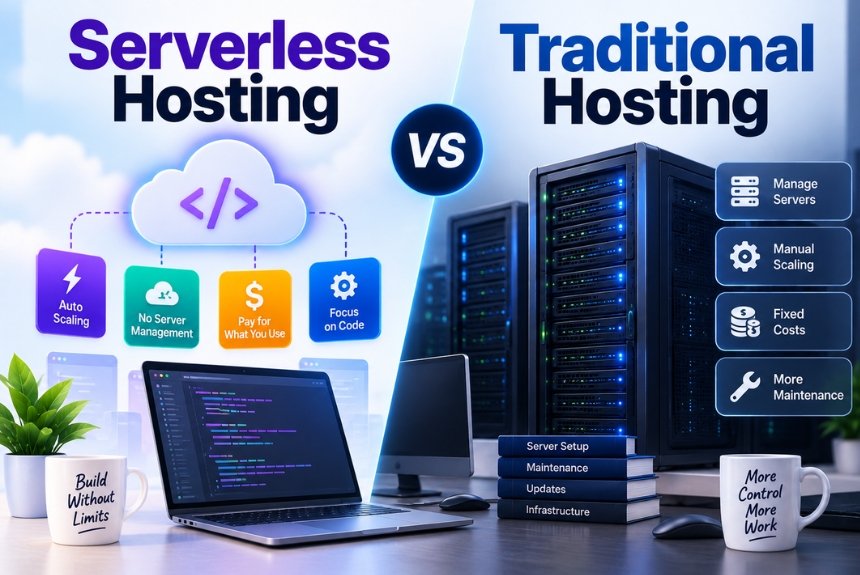
Serverless vs Traditional Hosting: How Do Modern Websites Choose?
Introduction
Choosing the right hosting architecture can have a major impact on how a website or web application performs, scales, costs, and is maintained.
For years, most websites followed a relatively straightforward model: purchase or rent server resources, upload the website or application, configure the environment, and keep the server running continuously.
Today, developers have another option: serverless computing.
Despite its name, serverless computing still uses servers. The difference is that the cloud provider manages much of the underlying infrastructure, including provisioning, scaling, and server maintenance. Developers generally focus on application code rather than managing individual servers.
This creates an important question:
Should your website use traditional hosting or serverless hosting?
There is no universal answer.
Traditional hosting can be simple, predictable, and highly suitable for websites that need continuously available application environments. Serverless can be attractive for event-driven applications, APIs, variable workloads, and projects where automatic scaling and reduced infrastructure management are important.
The right choice depends on what you’re building, how users access it, how traffic behaves, and how much control you need over the underlying environment.
What Is Traditional Hosting?
Traditional hosting generally means that your website or application runs on a server or virtual server with allocated resources.
Depending on the hosting model, you might use:
- Shared hosting
- VPS hosting
- Dedicated servers
- Cloud virtual machines
- Managed hosting
- Container-based hosting
The exact architecture varies, but the fundamental idea is similar:
Your application runs on persistent computing infrastructure.
For example:
Visitor → Web Server → Application → Database
The server remains available even when traffic is low.
With a VPS, for example, you may receive a specific amount of:
- CPU
- RAM
- Storage
- Bandwidth
- Operating system resources
Your hosting provider may manage some infrastructure, but depending on the hosting type, you or your development team may still be responsible for application configuration, updates, scaling, security, and server administration.
Traditional server-based applications can be especially useful when an application needs a persistent environment, long-running processes, customized server software, or predictable resource allocation.
What Is Serverless Hosting?
Serverless hosting is a cloud computing model where the provider manages the underlying infrastructure and automatically provisions resources when your application needs them.
You still use servers, but you generally don’t manage them directly.
Google Cloud explains that serverless abstracts infrastructure management from developers while allowing applications to scale according to demand.
A simplified architecture might look like:
Visitor → API Gateway / Serverless Platform → Function → Database
Instead of keeping an application server running continuously, individual pieces of application logic can execute when triggered.
These triggers might include:
- HTTP requests
- Form submissions
- Database events
- File uploads
- Scheduled jobs
- Queue messages
- Application events
This approach is commonly associated with Function as a Service (FaaS).
Why Is It Called “Serverless”?
The word can be confusing.
Serverless does not mean that servers don’t exist.
Servers still execute your code and store your data.
The term refers to the fact that the developer or business does not need to directly provision and manage those servers.
The provider handles much of the infrastructure.
Think of it this way:
Traditional Hosting
You rent a kitchen and are responsible for keeping it equipped and operational.
Serverless
You use a managed kitchen service and focus on preparing the food.
The infrastructure still exists. You simply have less responsibility for managing it.
Google Cloud and Cloudflare both emphasize that serverless does not eliminate physical servers; it abstracts infrastructure management from users.
Serverless vs Traditional Hosting: The Core Difference
The simplest difference is who manages the infrastructure and how computing resources are allocated.
| Feature | Traditional Hosting | Serverless Hosting |
|---|---|---|
| Server management | More responsibility | Mostly provider-managed |
| Resource allocation | Usually predefined | Dynamically allocated |
| Scaling | Manual or configured autoscaling | Typically automatic |
| Billing | Often resource/time based | Usually usage based |
| Infrastructure control | Greater | More abstracted |
| Maintenance | More responsibility | Less infrastructure maintenance |
| Architecture | Often persistent | Often event-driven |
| Idle capacity | May remain allocated | Can scale down significantly |
| Deployment model | Application/server | Functions, services, or managed workloads |
| Best suited for | Persistent applications | Variable/event-driven workloads |
The exact features depend on the provider and service, so “serverless” should not be treated as one single hosting product.
How Traditional Hosting Works
Suppose you have an ecommerce website.
Your application might run on a virtual server with:
- 4 CPU cores
- 8 GB RAM
- 100 GB storage
The server runs continuously.
During normal traffic, perhaps only part of the capacity is being used.
During a major sale, traffic may increase dramatically.
You then need to ensure that the infrastructure can handle the additional load.
You might:
- Increase server resources
- Add additional servers
- Configure a load balancer
- Set up autoscaling
- Optimize database capacity
- Add caching
This provides significant control, but it also creates infrastructure responsibilities.
How Serverless Works
Now imagine the same application using a serverless architecture.
Instead of keeping a conventional application server running continuously, individual backend operations can execute when requests or events trigger them.
For example:
Customer clicks “Add to Cart”
↓
Request reaches serverless backend
↓
Function processes the request
↓
Database is updated
↓
Response is returned
When traffic increases, the platform can provision additional execution capacity automatically according to the service’s scaling model.
Google Cloud describes serverless platforms as automatically scaling resources based on demand, including the ability for some services to scale down to zero.
Serverless vs Traditional Hosting: Scalability
Scalability is one of the biggest differences people consider.
Traditional Hosting
With traditional hosting, scaling usually requires planning.
You might need to:
- Upgrade a VPS
- Add servers
- Configure load balancing
- Increase database resources
- Adjust autoscaling rules
- Monitor resource usage
Modern cloud infrastructure can automate much of this, but you generally remain responsible for configuring and managing the architecture.
Serverless
Serverless platforms are designed to automatically allocate resources according to incoming workloads.
For example, Google Cloud describes serverless as providing automatic scaling without requiring developers to manage the underlying servers.
Cloudflare Workers similarly provides automatic scaling for serverless applications deployed across its network.
Important Point
Automatic scaling doesn’t mean unlimited capacity with no constraints.
Serverless services still have:
- Execution limits
- Concurrency limits
- Request limits
- Memory limits
- Runtime constraints
- Service-specific quotas
You still need to design your application appropriately.
Which Is More Cost-Effective?
Cost is one of the most misunderstood parts of the serverless vs traditional hosting debate.
There is no universal winner.
Traditional Hosting Cost Model
You typically pay for allocated infrastructure.
For example:
$50/month VPS
You pay that amount whether the server is heavily used or lightly used.
The advantage is predictability.
Serverless Cost Model
Serverless platforms commonly use consumption-based pricing.
You may pay based on things such as:
- Number of requests
- Execution duration
- CPU usage
- Memory
- Data transfer
- Storage
- Additional managed services
Google Cloud describes serverless pricing as generally based on actual resource usage, with some services able to scale down when demand falls.
AWS similarly describes serverless services as consumption-based, although pricing varies by service.
When Serverless Can Be Cheaper
Serverless can be attractive when traffic is:
- Highly variable
- Infrequent
- Event-driven
- Seasonal
- Difficult to predict
For example, imagine a business application that receives requests mainly during working hours.
Instead of paying for substantial server capacity 24 hours a day, a serverless architecture can allocate resources according to actual workload.
When Traditional Hosting Can Be Cheaper
Traditional hosting may be more economical when workloads are:
- Consistent
- Predictable
- High-volume
- Continuously running
If an application uses substantial computing resources around the clock, paying for dedicated or reserved capacity can sometimes be more predictable than paying for every invocation.
AWS’s current serverless guidance specifically notes that highly variable workloads can favor usage-based pricing, while steady workloads may benefit from capacity-based pricing.
Serverless vs Traditional Hosting Performance
Performance depends heavily on the application.
It would be inaccurate to say:
“Serverless is always faster.”
It isn’t.
And it would be equally inaccurate to say:
“Traditional servers are always faster.”
They aren’t.
Performance depends on:
- Application architecture
- Database performance
- Network location
- Code efficiency
- Runtime
- Caching
- Request volume
- Server resources
- Application dependencies
What Are Cold Starts?
One concept commonly associated with serverless is the cold start.
When a serverless function hasn’t been running recently, the platform may need to initialize its execution environment before processing a request.
That initialization can add latency.
The exact behavior depends on the provider and runtime.
Modern serverless platforms use different techniques to reduce this effect. For example, Cloudflare Workers uses lightweight V8 isolates and describes them as having fast startup characteristics.
This means you should evaluate the actual platform rather than assuming every serverless service behaves the same way.
Traditional Hosting Performance Advantages
Traditional hosting can provide predictable performance because your application can remain continuously active.
This can be useful for:
- Long-running applications
- Persistent processes
- Large monolithic applications
- Applications requiring specialized software
- Workloads with consistent resource usage
You also have greater control over resource allocation.
If your application needs a specific runtime configuration, background process, or operating-system-level customization, a traditional server can be easier to manage.
Serverless Performance Advantages
Serverless can provide advantages when applications experience unpredictable demand.
Instead of maintaining a large server for occasional traffic spikes, the platform can allocate additional execution resources as requests increase.
Serverless can also be deployed close to users depending on the platform.
Cloudflare Workers, for example, executes code across its distributed network, while Google Cloud offers managed serverless application infrastructure.
Serverless vs Traditional Hosting for Websites
This is where things get interesting.
Not every website actually needs serverless architecture.
Static Website
A static website usually doesn’t require a complex backend.
You might simply need:
- HTML
- CSS
- JavaScript
- Images
- CDN
Serverless may be unnecessary unless you’re adding dynamic functionality.
WordPress Website
Traditional hosting is usually the more natural architecture for WordPress.
WordPress commonly relies on:
- PHP
- MySQL/MariaDB
- Persistent files
- Plugins
- Themes
- Server-side processing
A conventional hosting environment is therefore often simpler.
Serverless can still be involved in supporting services, APIs, image processing, or specific integrations, but completely rebuilding a conventional WordPress website around serverless architecture may introduce unnecessary complexity.
Ecommerce Website
Ecommerce can use either approach.
A traditional architecture might run:
Web Server → Application → Database
A modern architecture might use:
CDN → Serverless Functions → Managed Services → Database
The second model can scale well, but it requires developers to design the application around serverless principles.
Serverless vs Traditional Hosting for Web Applications
Serverless becomes particularly interesting when you’re building an application rather than a conventional website.
Examples include:
- SaaS platforms
- APIs
- Mobile backends
- Dashboards
- Automation tools
- Event-processing systems
- AI-powered applications
- Webhooks
- Scheduled jobs
These applications often contain many individual operations that can be triggered independently.
That fits naturally with event-driven serverless architecture.
Google Cloud lists REST APIs, asynchronous processing, scheduled tasks, event-driven workloads, and real-time data processing among common serverless use cases.
Advantages of Traditional Hosting
1. More Control
You generally have greater control over:
- Operating system
- Server configuration
- Runtime
- Installed software
- Networking
- Processes
- Resource allocation
This is useful for specialized applications.
2. Predictable Resource Allocation
You know what resources you’re paying for.
A VPS with 8 GB RAM remains available whether traffic is low or high.
This can make capacity planning easier for predictable workloads.
3. Persistent Environment
Traditional servers are well suited to applications that need persistent processes.
For example:
- Long-running workers
- Custom daemons
- Persistent connections
- Specialized services
4. Easier Migration for Some Applications
Many existing websites were built for conventional server environments.
Moving them to a serverless architecture may require significant development work.
Keeping the existing architecture can therefore be simpler.
5. Familiar Technology Stack
Traditional hosting supports widely used stacks such as:
- PHP
- WordPress
- Laravel
- Node.js
- Python
- Django
- Ruby
- Java
- .NET
You can often deploy these applications without fundamentally changing their architecture.
Disadvantages of Traditional Hosting
1. Infrastructure Management
Depending on your hosting model, you may need to handle:
- Server updates
- Security patches
- Resource monitoring
- Scaling
- Configuration
- Backups
- Deployment
Managed hosting can reduce this burden, but the level of responsibility varies.
2. Idle Resources
If you rent a server continuously, you may pay for capacity that isn’t always being used.
This is particularly noticeable with highly unpredictable traffic.
3. Scaling Requires Planning
A sudden traffic spike can overwhelm a server if the architecture isn’t designed for it.
You may need additional infrastructure or autoscaling.
4. Higher Operational Responsibility
As your infrastructure grows, configuration and maintenance can become increasingly complex.
Advantages of Serverless Hosting
1. Less Infrastructure Management
The cloud provider handles much of the underlying infrastructure.
Developers can focus more on application logic rather than provisioning and maintaining servers.
2. Automatic Scaling
Serverless platforms can automatically respond to changes in request volume.
This makes them useful for applications with unpredictable traffic.
3. Usage-Based Pricing
You can often pay according to actual usage rather than maintaining fixed capacity.
This can be useful for applications with intermittent workloads.
4. Faster Development
Developers can use managed services instead of building and maintaining every infrastructure component themselves.
For example:
Authentication → Managed Service
API → Serverless Function
Storage → Managed Storage
Database → Managed Database
This can accelerate development.
5. Easy Integration With Cloud Services
Serverless platforms are often designed to work with:
- Databases
- Queues
- Storage
- APIs
- Authentication
- Event systems
- Monitoring
- AI services
AWS currently provides serverless services across compute, APIs, application integration, orchestration, and data storage.
Disadvantages of Serverless Hosting
1. Less Infrastructure Control
You give up some control in exchange for convenience.
You may not be able to configure the underlying infrastructure as freely as you can with a VPS or dedicated server.
2. Architecture Complexity
Ironically, serverless can simplify infrastructure management while making application architecture more complex.
Instead of one application running on one server, you might have:
- Functions
- APIs
- Queues
- Databases
- Object storage
- Authentication services
- Event triggers
Managing the relationships between these services requires careful architecture.
3. Vendor Lock-In
If your application relies heavily on proprietary cloud services, moving it to another provider may require substantial changes.
For example, replacing one provider’s event system, database, authentication service, and function runtime may require significant redevelopment.
4. Runtime Limitations
Serverless functions may have restrictions around:
- Execution duration
- Memory
- CPU
- Package size
- Temporary storage
- Concurrency
The exact limits depend on the platform.
AWS, for example, documents specific execution and concurrency characteristics for Lambda, while different serverless products have different models and limits.
5. Cost Can Become Less Predictable
Usage-based pricing sounds simple, but high traffic can produce significant bills.
An application receiving millions of requests needs careful cost monitoring.
Serverless isn’t automatically cheaper just because you pay for usage.
Serverless vs Traditional Hosting: Security
Both approaches can be secure.
The security model is simply different.
Traditional Hosting
You may be responsible for:
- Operating-system updates
- Server configuration
- Firewall rules
- Application security
- Access management
- Vulnerability patching
Managed hosting can reduce some of this responsibility.
Serverless
The provider manages much of the underlying infrastructure, but you remain responsible for application-level security.
You still need to protect:
- APIs
- Authentication
- Authorization
- Secrets
- User data
- Dependencies
- Input validation
Serverless does not mean “automatically secure.”
It means some infrastructure responsibilities are shifted to the provider.
Serverless vs Traditional Hosting for SEO
For ordinary websites, the hosting architecture itself isn’t an SEO strategy.
Search engines don’t simply reward a website because it uses serverless infrastructure.
What matters is the resulting website experience and technical accessibility.
Your architecture should help deliver:
- Fast responses
- Crawlable pages
- Reliable uptime
- Mobile-friendly experiences
- Stable layouts
- Accessible content
- Proper status codes
A traditional server can deliver all of these.
A serverless architecture can also deliver all of these.
The technology should therefore be selected based on the application’s requirements rather than SEO fashion.
Which Hosting Model Is Easier?
For a beginner, this depends on what you’re building.
Simple Website
Traditional managed hosting is often easier.
You can install a CMS, select a theme, configure caching, and manage the website through a control panel.
Custom Web Application
Serverless can simplify infrastructure management but requires a different development mindset.
You’ll need to understand concepts such as:
- APIs
- Functions
- Events
- Managed databases
- Authentication
- Deployment pipelines
So serverless doesn’t necessarily mean easier overall.
It means less server management.
That’s an important distinction.
When Should You Choose Traditional Hosting?
Traditional hosting can make sense when:
- You run WordPress
- You need a persistent server
- Your traffic is predictable
- You require operating-system control
- Your application is already server-based
- You use specialized server software
- You need long-running processes
- You want predictable infrastructure costs
- You prefer a simpler deployment model
For many small and medium websites, this remains a practical approach.
When Should You Choose Serverless?
Serverless can be particularly suitable when:
- Traffic changes significantly
- You have event-driven workloads
- You are building APIs
- You need automatic scaling
- You want minimal server management
- You have intermittent workloads
- You are building cloud-native applications
- You need globally distributed application logic
- You want to use managed cloud services extensively
Google Cloud identifies APIs, event-driven processing, scheduled jobs, asynchronous workloads, and real-time processing among common serverless applications.
Can You Use Both?
Yes.
In fact, hybrid architectures are often practical.
You don’t have to choose between “everything traditional” and “everything serverless.”
For example:
Website → Traditional Hosting
Images → CDN
Contact Form → Serverless Function
Email Processing → Serverless Function
Database → Managed Cloud Database
Scheduled Reports → Serverless Job
This lets each component use the infrastructure model that fits it.
A Practical Example
Imagine an online store with 100,000 monthly visitors.
The main ecommerce application could run on a traditional cloud server because it requires:
- Persistent PHP processes
- Database connectivity
- Product management
- Customer accounts
- Shopping cart functionality
Meanwhile, the store could use serverless functions for:
- Order notifications
- Image processing
- Webhooks
- Inventory alerts
- Scheduled reports
The architecture might look like:
Customer
↓
CDN
↓
Traditional Ecommerce Application
↓
Database
And alongside it:
Order Event
↓
Serverless Function
↓
Email / Notification / Analytics
This hybrid approach avoids forcing every workload into the same infrastructure model.
Serverless vs Traditional Hosting Decision Checklist
Before choosing a hosting model, ask:
1. How predictable is your traffic?
If traffic is steady, traditional hosting may be easier to plan.
If traffic fluctuates significantly, serverless may provide useful automatic scaling.
2. Does your application need a persistent environment?
If yes, traditional hosting may be more suitable.
3. Do you need operating-system-level control?
If yes, a VPS, dedicated server, or similar environment may provide more flexibility.
4. Is your application event-driven?
If yes, serverless functions may fit naturally.
5. How much infrastructure do you want to manage?
If you want to minimize server administration, serverless can reduce that responsibility.
6. What is your expected traffic?
Estimate:
- Average requests
- Peak requests
- Seasonal spikes
- Background jobs
- API calls
7. How important is predictable pricing?
If predictable monthly infrastructure costs are important, traditional hosting can sometimes be easier to budget.
8. Are you comfortable with cloud architecture?
If not, a managed traditional hosting environment may provide a simpler starting point.
Serverless vs Traditional Hosting: Quick Comparison
| Factor | Traditional Hosting | Serverless |
|---|---|---|
| Server control | High | Low |
| Server management | Higher | Lower |
| Scaling | Manual/configured | Generally automatic |
| Pricing | Often capacity-based | Often usage-based |
| Persistent processes | Strong fit | Often limited by service |
| Event-driven workloads | Possible | Strong fit |
| Variable traffic | Requires planning | Strong fit |
| Predictable workloads | Strong fit | Can work |
| WordPress | Strong fit | Usually less natural |
| APIs | Strong fit | Strong fit |
| Cloud-native apps | Possible | Strong fit |
| Infrastructure complexity | Can be simpler | Can become distributed |
| Vendor dependency | Usually lower | Can be higher |
| Custom server configuration | Strong | Limited |
| Maintenance | More | Less infrastructure maintenance |
Common Myths About Serverless Hosting
Myth 1: Serverless Means No Servers
False.
Servers still run your application. The provider manages them for you.
Myth 2: Serverless Is Always Cheaper
Not necessarily.
Costs depend on workload, request volume, execution time, storage, networking, and other services.
Myth 3: Serverless Is Always Faster
Not necessarily.
Performance depends on architecture and implementation.
Myth 4: Serverless Automatically Scales Without Limits
Serverless platforms provide automatic scaling, but every platform has its own limits and service characteristics.
Myth 5: Traditional Hosting Is Outdated
Traditional hosting remains useful for many applications, especially those requiring persistent environments and predictable resources.
Myth 6: You Must Choose One Architecture
You don’t.
Hybrid architectures can combine traditional hosting and serverless components.
The Future of Web Hosting
Modern hosting is becoming increasingly flexible.
Instead of choosing only between a physical server and a VPS, developers can now combine:
- Virtual machines
- Containers
- Managed databases
- Serverless functions
- Edge computing
- CDNs
- Object storage
- Managed APIs
- AI services
This allows different parts of an application to use different infrastructure models.
Cloud platforms are also expanding serverless offerings beyond simple functions. For example, Google Cloud’s current serverless portfolio includes Cloud Run for deploying containerized applications without directly managing the underlying servers.
The result is that the distinction between “traditional” and “serverless” hosting is becoming less absolute.
Modern applications can combine multiple approaches.
Frequently Asked Questions
1. Is serverless better than traditional hosting?
Neither is universally better. The appropriate choice depends on your application’s architecture, traffic patterns, performance requirements, infrastructure control, and budget.
2. Is serverless hosting good for WordPress?
Traditional managed hosting is generally a more natural fit for conventional WordPress installations because WordPress relies on a persistent server-side application environment and database.
3. Is serverless hosting expensive?
It can be inexpensive for low or variable workloads, but costs depend on usage. High request volumes or complex workloads can increase expenses.
4. Does serverless hosting scale automatically?
Many serverless platforms provide automatic scaling, but the exact behavior and limits vary by provider and service.
5. What is FaaS?
FaaS stands for Function as a Service. It allows developers to deploy individual pieces of application logic that execute in response to events or requests.
6. Can a website use both serverless and traditional hosting?
Yes. A website can run its primary application on conventional infrastructure while using serverless functions for APIs, webhooks, notifications, scheduled tasks, or other specialized workloads.
7. Does serverless improve website SEO?
Serverless architecture does not directly improve SEO. However, an appropriately designed architecture can support performance, reliability, and scalability, which can contribute to a better website experience.
8. What is the biggest advantage of serverless?
One of the main advantages is reduced infrastructure management. The provider handles much of the provisioning and scaling, allowing developers to focus more on application logic.
9. What is the biggest advantage of traditional hosting?
Traditional hosting provides greater control and can offer predictable resources and a persistent environment, which is useful for many conventional websites and applications.
Conclusion
The choice between serverless vs traditional hosting isn’t really about deciding which technology is newer.
It’s about choosing the architecture that matches your workload.
Traditional hosting remains a strong option for websites and applications that need persistent environments, predictable resources, customized server configurations, or straightforward deployment.
Serverless is particularly useful when you want to reduce infrastructure management, automatically respond to changing workloads, and build event-driven applications using managed cloud services.
And in many cases, you don’t need to choose just one.
A modern website can use traditional hosting for its primary application, a CDN for content delivery, serverless functions for specific backend tasks, and managed cloud services for databases or storage.
The best hosting architecture is therefore not necessarily the most modern one.
It is the one that gives your website the right balance of performance, scalability, control, cost, and operational simplicity.
Leave a Reply