


Website speed and security are two of the most important factors influencing the success of any WordPress website. A fast-loading website improves visitor engagement, enhances user experience, and supports higher search engine rankings. At the same time, strong security measures protect sensitive data, reduce downtime, and safeguard your website against cyber threats.
WP Engine is one of the leading managed WordPress hosting providers, known for combining high-performance infrastructure with enterprise-grade security. Instead of requiring website owners to configure multiple plugins and third-party services, WP Engine includes several advanced performance and security features as part of its managed hosting platform.
Whether you’re running a business website, WooCommerce store, blog, or enterprise application, WP Engine helps maintain fast loading speeds while protecting your website from malware, hacking attempts, and data loss. Features such as EverCache® technology, integrated CDN, automatic backups, malware monitoring, SSL certificates, and proactive security updates work together to provide a reliable hosting environment.
This guide explores every major aspect of WP Engine Speed and Security, helping you understand how these technologies improve website performance, protect business data, and create a better experience for visitors.
Why Website Speed and Security Matter
Website performance and security directly affect business success. Visitors expect websites to load quickly, and search engines reward fast, secure websites with better visibility in search results. Even a small delay in page loading can increase bounce rates and reduce conversions.
Similarly, security has become a critical concern for every website owner. Cyberattacks, malware infections, and data breaches can damage customer trust, interrupt business operations, and negatively affect search engine rankings.
Managed WordPress hosting providers like WP Engine reduce these risks by combining performance optimization with proactive security management.
Benefits of Faster Websites
Fast-loading websites provide several measurable advantages:
- Better user experience
- Lower bounce rates
- Improved conversion rates
- Higher search engine rankings
- Increased visitor engagement
- Better Core Web Vitals performance
- Improved customer satisfaction
Businesses that invest in website speed often experience higher customer retention and stronger online visibility.
Benefits of Strong Website Security
Security is equally important because it protects both website owners and visitors.
A secure website helps:
- Prevent malware infections
- Protect customer information
- Reduce website downtime
- Prevent unauthorized access
- Improve business credibility
- Maintain search engine trust
- Support secure online transactions
These security measures are particularly important for businesses handling customer accounts, online payments, or confidential information.
How WP Engine Combines Speed and Security
Unlike traditional hosting providers, WP Engine integrates performance optimization and security into a single managed platform.
This approach provides several advantages:
- Optimized WordPress infrastructure
- Automatic software updates
- Built-in caching
- Global CDN integration
- Daily automated backups
- Malware detection
- Firewall protection
- SSL encryption
- Continuous monitoring
By managing these services centrally, WP Engine reduces technical complexity while maintaining excellent website performance.
Speed and Security Comparison
| Feature | Traditional Hosting | WP Engine |
| Performance Optimization | Limited | Advanced |
| Built-in Caching | Basic | EverCache® |
| CDN | Optional | Included |
| Daily Backups | Limited | Included |
| Malware Monitoring | Usually Extra | Included |
| SSL Certificates | Sometimes Extra | Included |
| Automatic Updates | Manual | Managed |
| WordPress Security | Basic | Enterprise-grade |
Table 1. Traditional hosting compared with WP Engine managed hosting.
Why Businesses Choose WP Engine
Businesses increasingly choose managed WordPress hosting because maintaining website performance and security manually requires significant technical expertise.
WP Engine simplifies this process by providing:
- Reliable hosting infrastructure
- High-speed website delivery
- Continuous security monitoring
- Automatic backups
- Professional WordPress support
- Performance optimization
- Simplified website management
This combination allows website owners to spend more time growing their business rather than managing servers or resolving technical issues.
Expert Analysis
Website speed and security should never be treated as separate priorities. A high-performing website that lacks proper security remains vulnerable to cyber threats, while a secure website with poor performance can lose visitors and search rankings. WP Engine successfully combines both aspects through managed WordPress hosting, providing businesses with a secure, reliable, and optimized platform for long-term growth.
Why Speed Matters
Website speed is one of the most influential factors affecting user experience, search engine rankings, and business success. Modern internet users expect websites to load within a few seconds, and even small delays can lead to higher bounce rates and lower customer satisfaction. For businesses that rely on online sales, lead generation, or content marketing, website speed directly impacts revenue and brand reputation.
Google also considers page speed as a ranking factor. Faster websites are more likely to perform well in search results because they provide a better experience for users. This makes website performance an essential part of any SEO strategy.
WP Engine is designed to deliver consistently fast performance by combining optimized WordPress hosting, advanced caching technologies, global content delivery, and modern server infrastructure. Instead of relying solely on plugins for optimization, WP Engine improves speed at the server level, resulting in faster page delivery and greater stability.
Why Website Speed Is Important
A fast website provides benefits that extend beyond user satisfaction. It contributes to improved search visibility, increased engagement, and better business outcomes.
Some key advantages include:
- Improved search engine rankings
- Better user experience
- Reduced bounce rates
- Higher conversion rates
- Faster page loading
- Increased customer satisfaction
- Better Core Web Vitals performance
- Improved mobile browsing experience
Businesses with fast-loading websites often experience better customer retention because visitors are more likely to stay, explore additional pages, and complete desired actions.
Impact on Search Engine Optimization
Search engines prioritize websites that provide valuable content along with excellent user experience. Website speed influences several SEO metrics, including page experience, crawl efficiency, and Core Web Vitals.
A faster website can contribute to:
- Better indexing by search engines
- Improved keyword rankings
- Higher organic traffic
- Lower page abandonment rates
- Increased average session duration
Although quality content remains the primary ranking factor, website performance plays an important supporting role in long-term SEO success.
Benefits for Business Websites
Every second saved during page loading can positively affect business performance.
Fast websites help businesses:
- Build customer trust
- Improve lead generation
- Increase online sales
- Encourage repeat visitors
- Strengthen brand reputation
- Reduce customer frustration
For WooCommerce stores, faster product pages and checkout processes can significantly improve conversion rates and reduce cart abandonment.
Speed Comparison
| Performance Factor | Slow Website | Fast Website |
| User Experience | Poor | Excellent |
| Bounce Rate | High | Low |
| Search Engine Rankings | Lower | Higher |
| Customer Satisfaction | Moderate | High |
| Conversion Potential | Lower | Higher |
Table 2. Impact of website speed on business performance.
EverCache®
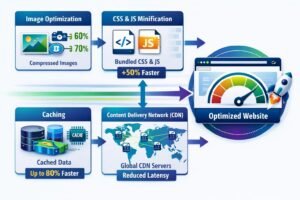
One of the biggest reasons behind WP Engine Speed and Security is its proprietary EverCache® technology. EverCache is an advanced server-level caching system designed specifically for WordPress websites. Unlike traditional caching plugins that rely on website resources, EverCache intelligently stores and delivers frequently accessed content directly from optimized servers.
This approach significantly reduces server workload while improving website responsiveness, even during periods of heavy traffic.
EverCache automatically determines which content should be cached and refreshed, ensuring visitors receive fast page loads without requiring manual configuration. Because caching is managed at the server level, website owners spend less time adjusting plugins and more time focusing on business growth.
How EverCache Works
EverCache stores commonly requested website content in memory, allowing it to be served quickly whenever visitors request the same information. Instead of generating every page from scratch, the server delivers cached content almost instantly, reducing processing time and improving efficiency.
The technology works continuously in the background by:
- Identifying frequently accessed content
- Serving cached pages whenever possible
- Refreshing cache after website updates
- Optimizing server resources
- Reducing unnecessary database requests
This intelligent caching process ensures websites remain fast while minimizing server load.
Advantages of EverCache
EverCache provides several important benefits for WordPress websites.
Improved Loading Speed
Server-level caching helps pages load much faster than traditional hosting environments.
Better Traffic Handling
Websites remain responsive even when large numbers of visitors access the site simultaneously.
Reduced Server Load
By serving cached content, EverCache decreases the number of database queries and PHP processes required to generate pages.
Automatic Optimization
Website owners do not need to manually configure complex caching settings or install multiple optimization plugins.
Better Scalability
As website traffic grows, EverCache helps maintain consistent performance without significantly affecting loading speed.
EverCache vs Traditional Caching
| Feature | Traditional Cache Plugin | EverCache® |
| Server-Level Optimization | No | Yes |
| Automatic Cache Management | Limited | Yes |
| Database Load Reduction | Moderate | Excellent |
| Traffic Spike Handling | Moderate | Excellent |
| Manual Configuration | Often Required | Minimal |
| WordPress Optimization | Basic | Advanced |
Table 3. EverCache compared with traditional WordPress caching solutions.
Why EverCache Matters
Caching is one of the most effective ways to improve website performance, but its effectiveness depends on how it is implemented. EverCache provides enterprise-level caching without requiring technical expertise, making it valuable for businesses, bloggers, agencies, and WooCommerce stores alike.
By reducing loading times, improving server efficiency, and supporting consistent website performance, EverCache plays a major role in delivering the speed and reliability for which WP Engine is known.
Expert Analysis
EverCache is one of WP Engine’s standout features and a key reason many businesses choose its managed WordPress hosting platform. Its intelligent server-level caching improves page speed, supports SEO performance, and helps websites remain stable during traffic spikes. Combined with WP Engine’s optimized infrastructure, EverCache creates a fast and reliable hosting environment suitable for websites of all sizes.
Content Delivery Network (CDN)
A Content Delivery Network (CDN) is one of the most effective technologies for improving website performance. Instead of serving website content from a single server location, a CDN distributes static content such as images, CSS files, JavaScript, fonts, and videos across multiple servers located around the world. When a visitor accesses a website, the CDN automatically delivers content from the server closest to their location, reducing latency and improving loading speed.
WP Engine includes a built-in CDN with its managed WordPress hosting plans, eliminating the need for users to purchase or configure a separate CDN service. This integration improves global website performance while reducing the workload on the primary hosting server.
For businesses serving visitors from different countries, a CDN ensures a faster and more consistent browsing experience regardless of geographical location.
Benefits of Using a CDN
Using a CDN provides several performance advantages.
- Faster page loading worldwide
- Lower latency for international visitors
- Reduced server workload
- Better website availability
- Improved website scalability
- Enhanced user experience
- Better search engine performance
- Faster delivery of static files
These benefits become increasingly important as website traffic grows and audiences expand across multiple regions.
How WP Engine’s CDN Improves Performance
WP Engine’s integrated CDN automatically stores and delivers static website content through a distributed network of servers. This reduces the distance between users and website resources, allowing pages to load more quickly.
The CDN also minimizes the number of requests handled by the origin server, improving website stability during periods of increased traffic.
Key advantages include:
- Faster image delivery
- Optimized CSS and JavaScript loading
- Improved mobile browsing experience
- Reduced bandwidth usage
- Better website responsiveness
- Consistent global performance
Because the CDN is integrated into WP Engine’s managed hosting platform, users can benefit from improved performance without additional technical configuration.
CDN vs Traditional Hosting
| Feature | Traditional Hosting | WP Engine CDN |
| Global Content Delivery | Limited | Yes |
| Static File Optimization | Basic | Advanced |
| International Performance | Moderate | Excellent |
| Server Load Reduction | Low | High |
| Website Scalability | Moderate | Excellent |
| Visitor Experience | Good | Excellent |
Table 4. Traditional hosting compared with WP Engine’s integrated CDN.
Business Benefits
For businesses with customers in different regions, faster content delivery can improve customer satisfaction and increase engagement. A CDN also supports digital marketing efforts by ensuring landing pages, product pages, and blog posts load quickly regardless of visitor location.
Whether operating a local business website or a global eCommerce platform, integrating a CDN contributes to improved performance and a more reliable browsing experience.
Automatic Backups
Website backups are one of the most important components of a secure hosting environment. Unexpected issues such as plugin conflicts, accidental content deletion, software errors, or cyberattacks can lead to data loss if recent backups are unavailable.
WP Engine simplifies website protection by performing automatic daily backups for every managed WordPress website. These backups allow website owners to restore previous versions quickly whenever necessary, reducing downtime and minimizing business disruption.
Unlike manual backup solutions, WP Engine’s backup system operates automatically, ensuring that recent copies of website files and databases are consistently available.
Why Backups Are Important
Regular backups protect websites against a wide range of unexpected situations, including:
- Plugin or theme conflicts
- Failed WordPress updates
- Malware infections
- Accidental file deletion
- Human error
- Website corruption
- Server-related issues
Having a reliable backup ensures businesses can recover quickly without rebuilding their websites from scratch.
Backup Features
WP Engine’s backup system includes several valuable capabilities:
- Automatic daily backups
- Manual backup creation before major updates
- One-click restoration
- Secure backup storage
- Fast recovery process
- Protection against accidental data loss
These features provide website owners with greater confidence when performing updates or making significant changes.
Backup Comparison
| Feature | Manual Backups | WP Engine Automatic Backups |
| Daily Backup Creation | Manual | Automatic |
| One-Click Restore | Limited | Yes |
| Scheduled Protection | No | Yes |
| Data Recovery | Moderate | Excellent |
| Ease of Management | Moderate | Easy |
Table 5. Manual backups compared with WP Engine’s automated backup system.
Benefits for Businesses
Automatic backups reduce operational risks and improve business continuity. Organizations can confidently update plugins, install new themes, or modify website content knowing that a recent backup is always available if something goes wrong.
For eCommerce stores, membership platforms, and corporate websites, reliable backups help protect valuable customer information and minimize downtime during unexpected incidents.
Expert Analysis
WP Engine’s integrated CDN and automatic backup system work together to enhance both website performance and security. While the CDN improves loading speed and global accessibility, automatic backups provide an essential layer of protection against data loss and website failures. Together, these features strengthen the overall reliability of WP Engine’s managed WordPress hosting platform and contribute significantly to a better user experience.
Malware Protection
Cybersecurity threats continue to evolve, making malware protection an essential component of modern website management. WordPress powers millions of websites worldwide, making it a frequent target for hackers, malicious bots, ransomware attacks, and malware infections. A compromised website can result in data loss, reduced search engine rankings, damaged customer trust, and financial losses.
WP Engine addresses these challenges by implementing a proactive security approach that continuously monitors websites for suspicious activity. Instead of relying solely on security plugins, WP Engine integrates multiple layers of protection into its managed hosting environment to minimize vulnerabilities and detect threats before they affect website performance.
This managed security model allows website owners to focus on growing their business while WP Engine handles much of the technical security management behind the scenes.
Common Security Threats
WordPress websites may face various security risks if not properly protected.
Some of the most common threats include:
- Malware infections
- Brute-force login attacks
- SQL injection attacks
- Cross-site scripting (XSS)
- Distributed Denial-of-Service (DDoS) attacks
- Unauthorized administrator access
- Vulnerable plugins and themes
- Spam and malicious bots
Without proactive monitoring, these threats can compromise website functionality and expose sensitive business information.
How WP Engine Protects Websites
WP Engine employs a multi-layered security strategy designed specifically for WordPress hosting.
Its security measures include:
- Continuous malware monitoring
- Enterprise-grade firewall protection
- Automatic WordPress core updates
- Threat detection systems
- Secure server configurations
- Login protection
- Network-level security monitoring
- Proactive vulnerability management
By combining these technologies, WP Engine significantly reduces the likelihood of successful cyberattacks.
Benefits of Malware Protection
A strong malware protection system offers several advantages.
- Prevents unauthorized website access
- Protects customer and business data
- Reduces downtime caused by security incidents
- Maintains website availability
- Supports better search engine trust
- Improves customer confidence
- Protects website reputation
For businesses operating online stores or collecting customer information, these benefits are especially valuable.
Malware Protection Comparison
| Feature | Basic Hosting | WP Engine |
| Malware Monitoring | Limited | Continuous |
| Firewall Protection | Basic | Advanced |
| Automatic Security Updates | Limited | Included |
| Threat Detection | Basic | Proactive |
| WordPress Security Optimization | Limited | Advanced |
| Recovery Support | Limited | Yes |
Table 6. Malware protection comparison.
SSL Certificates
An SSL (Secure Sockets Layer) certificate encrypts communication between a website and its visitors. This encryption protects sensitive information such as login credentials, payment details, and personal data from being intercepted by unauthorized parties.
Today, HTTPS encryption has become a standard requirement for professional websites. Search engines also consider HTTPS an important trust signal, making SSL certificates beneficial for both security and SEO.
WP Engine includes free SSL certificates with its managed WordPress hosting plans, allowing website owners to secure their websites without purchasing additional security services.
Benefits of SSL Certificates
Using SSL provides several important advantages.
- Encrypts website data
- Protects customer information
- Secures online transactions
- Improves visitor trust
- Supports better SEO performance
- Displays HTTPS connection
- Reduces security risks
SSL certificates are particularly important for eCommerce websites, membership platforms, and business websites that collect customer information.
How SSL Improves SEO
Search engines prioritize websites that provide a secure browsing experience. HTTPS has become a recognized ranking signal and contributes to improved user confidence.
SSL also helps by:
- Reducing browser security warnings
- Increasing visitor confidence
- Supporting secure form submissions
- Improving website credibility
- Protecting customer privacy
Although SSL alone will not guarantee higher rankings, it contributes to a stronger overall SEO strategy.
SSL Comparison
| Feature | Website Without SSL | Website With WP Engine SSL |
| HTTPS Connection | No | Yes |
| Data Encryption | No | Yes |
| Browser Trust | Low | High |
| Secure Login | No | Yes |
| SEO Benefits | Limited | Improved |
| Customer Confidence | Moderate | High |
Table 7. SSL certificate benefits comparison.
Why Security Matters for Businesses
Security is no longer optional for businesses operating online. Customers expect websites to protect their personal information, and search engines increasingly reward secure websites with better visibility.
WP Engine’s managed security approach minimizes technical complexity while providing enterprise-grade protection through malware monitoring, automatic updates, firewall protection, and SSL encryption. This combination helps businesses reduce operational risks while maintaining a professional online presence.
Expert Analysis
Malware protection and SSL certificates are two of the strongest pillars of WP Engine Speed and Security. Together, they safeguard websites against modern cyber threats while creating a secure browsing experience for visitors. Combined with automatic updates, continuous monitoring, and managed WordPress security, these features allow businesses to focus on growth without constantly worrying about website security.
Performance
Website performance is one of the defining strengths of WP Engine. While speed refers to how quickly individual pages load, performance encompasses the overall responsiveness, stability, scalability, and efficiency of a website under different conditions. A high-performing website delivers a consistent experience regardless of visitor location, traffic volume, or website complexity.
WP Engine has built its hosting platform exclusively for WordPress, allowing it to optimize every aspect of website performance. Instead of using generic server configurations, it combines advanced caching, modern cloud infrastructure, integrated CDN, optimized databases, and proactive resource management to ensure websites remain fast and reliable.
Whether you’re running a personal blog with hundreds of monthly visitors or an enterprise website receiving thousands of simultaneous requests, WP Engine is designed to maintain excellent performance while minimizing downtime.
What Determines Website Performance?
Several factors influence the overall performance of a WordPress website. Hosting infrastructure is one of the most important, but website optimization, caching, and resource allocation also play significant roles.
Key performance factors include:
- Server response time
- Page loading speed
- Database optimization
- Content delivery
- Website uptime
- Resource allocation
- Caching efficiency
- Network latency
WP Engine optimizes each of these components to provide a smooth browsing experience for website visitors.
Performance Optimization Features
WP Engine includes several built-in technologies that improve website performance without requiring extensive manual configuration.
Some of the most valuable performance features include:
- EverCache® server-level caching
- Integrated global CDN
- Optimized WordPress hosting environment
- Automatic performance updates
- PHP optimization
- Efficient database management
- Image and static asset delivery
- Resource scaling during traffic spikes
These features work together to reduce loading times and improve website responsiveness.
Performance Benefits for Businesses
Website performance directly affects customer satisfaction and business growth. Faster websites encourage visitors to stay longer, browse additional pages, and complete important actions such as purchases or contact form submissions.
Business benefits include:
- Better customer experience
- Increased online sales
- Higher conversion rates
- Improved lead generation
- Greater customer retention
- Lower bounce rates
- Better SEO performance
- Increased website reliability
Organizations investing in high-performance hosting often experience measurable improvements in both user engagement and business outcomes.
Performance During High Traffic
Many websites experience temporary spikes in traffic due to marketing campaigns, product launches, seasonal promotions, or viral content. During these periods, inadequate hosting infrastructure can result in slow loading times or website downtime.
WP Engine is designed to manage these situations efficiently by combining scalable infrastructure with intelligent caching and optimized resource allocation.
Benefits during traffic spikes include:
- Stable website availability
- Consistent page loading speed
- Reduced server overload
- Improved visitor experience
- Better resource utilization
This makes WP Engine particularly suitable for businesses that depend on reliable website availability.
Performance Comparison
| Performance Feature | Standard Shared Hosting | WP Engine |
| WordPress Optimization | Basic | Advanced |
| Server-Level Caching | Limited | EverCache® |
| Global CDN | Optional | Included |
| Automatic Updates | Partial | Included |
| Daily Backups | Limited | Included |
| High-Traffic Handling | Moderate | Excellent |
| Scalability | Moderate | High |
| Overall Performance | Good | Excellent |
Table 8. Performance comparison between standard hosting and WP Engine.
Performance Best Practices
Although WP Engine provides an optimized hosting environment, website owners should also follow best practices to achieve maximum performance.
Recommended practices include:
- Keep WordPress updated.
- Remove unused plugins and themes.
- Compress and optimize images.
- Use lightweight, well-coded themes.
- Limit unnecessary third-party scripts.
- Regularly monitor website performance.
- Optimize large media files.
- Keep plugins updated to their latest versions.
Following these practices helps maintain consistent website speed and reduces unnecessary server load.
Best Practices to Maximize WP Engine Speed and Security
Although WP Engine provides a highly optimized managed WordPress hosting environment, website owners can further enhance performance and security by following a few best practices. Combining WP Engine’s built-in technologies with proper website management ensures consistent loading speeds, stronger protection against cyber threats, and a better overall user experience.
Implementing these practices not only improves website efficiency but also helps maintain long-term reliability as your business grows.

Keep WordPress Updated
Running the latest version of WordPress is one of the simplest yet most effective ways to maintain website security and performance. WordPress updates frequently include security patches, bug fixes, and performance improvements that help protect websites from newly discovered vulnerabilities.
Although WP Engine manages core WordPress updates, website owners should also ensure that installed themes and plugins remain updated. Outdated software is one of the leading causes of website security issues.
Benefits of regular updates include:
- Improved website stability
- Better compatibility with plugins
- Enhanced security protection
- Faster website performance
- Access to new WordPress features
Use High-Quality Plugins
Plugins extend WordPress functionality, but installing too many or using poorly coded plugins can negatively affect website speed and security.
To maintain optimal performance:
- Install plugins only when necessary.
- Choose plugins from reputable developers.
- Remove inactive or unused plugins.
- Keep all plugins updated.
- Avoid installing multiple plugins with overlapping functionality.
A streamlined website with fewer, high-quality plugins generally performs better and is easier to maintain.
Optimize Media Files
Large, uncompressed images are one of the most common causes of slow-loading websites. Before uploading images, compress them without significantly reducing quality.
Other recommendations include:
- Use modern image formats where appropriate.
- Resize images before uploading.
- Remove unnecessary media files.
- Organize the media library regularly.
Optimized media files reduce page size, improve loading times, and provide a smoother browsing experience across desktop and mobile devices.
Regularly Monitor Website Performance
Monitoring website performance helps identify issues before they affect visitors. Businesses should regularly review page speed, uptime, and resource usage to ensure consistent performance.
Important metrics to monitor include:
- Page loading time
- Website uptime
- Server response time
- Core Web Vitals
- Mobile performance
- Traffic trends
Regular performance reviews allow website owners to make informed optimization decisions and maintain a reliable online presence.
Strengthen Website Security
Even with WP Engine’s enterprise-grade security features, website owners should follow additional security practices to minimize risks.
Recommended measures include:
- Use strong administrator passwords.
- Enable multi-factor authentication where available.
- Limit administrator accounts.
- Remove unused themes and plugins.
- Review user permissions regularly.
- Monitor login activity.
- Schedule periodic security audits.
These practices complement WP Engine’s built-in security features and provide an additional layer of protection.
Plan for Future Growth
As websites attract more visitors and publish additional content, hosting requirements naturally increase. Businesses should periodically evaluate whether their current hosting plan continues to meet performance demands.
Consider upgrading when:
- Website traffic grows significantly.
- Multiple websites are added.
- WooCommerce functionality expands.
- Large media libraries increase storage usage.
- Business operations become more dependent on website availability.
Planning ahead ensures that websites remain fast, secure, and capable of handling future growth without unexpected performance issues.
Final Thoughts
WP Engine provides one of the most comprehensive managed WordPress hosting environments available, combining advanced speed optimization with enterprise-level security. However, the best results are achieved when website owners follow recommended optimization and security practices alongside WP Engine’s built-in technologies.
By maintaining updated software, optimizing media, selecting reliable plugins, monitoring performance, and following strong security practices, businesses can maximize the full potential of WP Engine. This proactive approach helps deliver faster loading speeds, stronger protection, improved SEO performance, and a consistently excellent user experience, ensuring that the website remains reliable and scalable as business requirements continue to evolve.
Conclusion
Website speed and security are no longer optional—they are essential components of a successful online presence. Slow-loading websites frustrate visitors, reduce search engine visibility, and negatively impact conversions, while weak security can expose businesses to malware, hacking attempts, and data loss.
WP Engine addresses both challenges through its managed WordPress hosting platform. Features such as EverCache®, integrated CDN, automatic daily backups, malware monitoring, enterprise-grade security, free SSL certificates, and optimized server infrastructure work together to deliver fast, secure, and reliable website performance.
Whether you operate a personal blog, business website, WooCommerce store, or enterprise platform, WP Engine provides the tools needed to maintain excellent performance while protecting valuable business data. Its managed approach reduces technical complexity, allowing website owners to focus on creating content, serving customers, and growing their business.
For organizations seeking premium managed WordPress hosting with a strong emphasis on speed, reliability, and security, WP Engine remains one of the leading solutions available today.
Frequently Asked Questions
1. Does WP Engine improve website speed?
Yes. WP Engine improves website speed through EverCache® server-level caching, integrated CDN, optimized WordPress infrastructure, and advanced performance optimization technologies.
2. Does WP Engine include a CDN?
Yes. WP Engine includes a built-in Content Delivery Network (CDN), helping websites load faster for visitors across different geographical locations.
3. Are daily backups included?
Yes. Automatic daily backups are included with WP Engine hosting plans, and websites can be restored quickly using the one-click restore feature.
4. How secure is WP Engine?
WP Engine provides enterprise-grade security through malware monitoring, firewall protection, automatic WordPress updates, SSL certificates, proactive threat detection, and continuous security monitoring.
5. Is WP Engine good for SEO?
Yes. Faster loading speeds, secure HTTPS connections, excellent uptime, and optimized WordPress performance contribute to improved user experience and support better search engine optimization.
Ready to Experience Faster & Safer WordPress Hosting?
If your website needs high performance, advanced security, and dependable managed WordPress hosting, WP Engine is a reliable solution. With built-in caching, CDN integration, automatic backups, malware protection, and expert WordPress support, it helps keep your site fast, secure, and scalable. Choose the plan that matches your business goals and enjoy a hosting platform designed for long-term growth.
Leave a Reply